Best Marketing & SEO resources for vibe coders
Updated 09/10/2026
This guide is for people who build apps with AI and now need users. You may not know marketing terms. You just want someone to audit your site, write a post, or make a launch video.
The resources below cover SEO audits, ad accounts, social research, LinkedIn posts and quick launch videos. All picks here have a 'safe' label and high quality scores. Some need setup, like connecting Google or ad accounts, so check each one before you start.
- PluginCaution
brag
latent-spaces
Enables AI agents to generate short, shareable launch videos with music and copy for a project or website using a single command.
16kMIT#1 · Why we picked it
Quality score 98 and beginner level; makes a short launch video with music and copy from one command. - PluginSafe
open-seo-mcp-skills
Ryze-AI-Adgent
Provides free SEO MCP server and skills for Claude, enabling keyword research, rank tracking, audits, and AI visibility using your own GSC/GA4 data.
5.8kMIT#2 · Why we picked it
A free SEO MCP server and skills for keyword research, audits and rank tracking using your own Search Console and GA4 data, so you need to connect those accounts. - PluginSafe
marketingskills
coreyhaines31
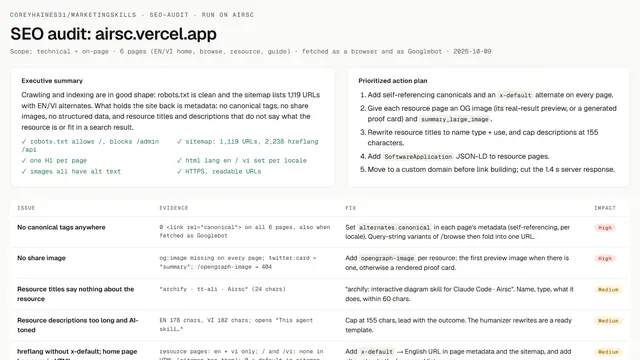
A collection of specialized skills for AI agents to assist with SEO, copywriting, conversion optimization, and growth marketing.
55kMIT#3 · Why we picked it
The most starred pick here (over 53,000), covering SEO, copywriting and conversion audits for landing pages. - MCP serverSafe
google-ads-meta-ads-mcp
irinabuht12-oss
Connects Claude, ChatGPT, and Cursor to Google Ads, Meta Ads, GA4, and Search Console with over 250 tools for ad management.
4kMIT#4 · Why we picked it
Connects Claude, ChatGPT and Cursor to Google Ads, Meta Ads, GA4 and Search Console to audit ad accounts; you must link your own accounts. - SkillSafe
goose-skills
gooseworks-ai
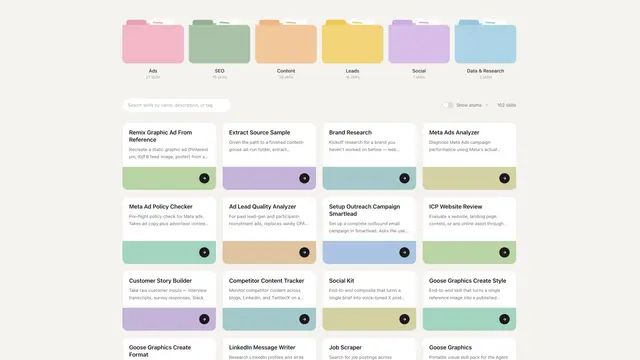
A library of AI agent skills for Claude Code, Cursor, and Codex, focused on growth and Go-To-Market tasks like ads, SEO, and lead generation.
1.2kMIT#5 · Why we picked it
One skill library that works in Claude Code and Cursor for SEO outlines, competitor research and campaign ideas. - PluginSafe
social-media-research-skills
ScrapeCreators
These AI agent skills enable social media research across platforms to find outlier posts, mine comments, and analyze competitors.
3.2kMIT#6 · Why we picked it
Finds top-performing posts, mines comments for audience pain points and studies competitors; check its setup notes for any API access. - PluginSafe
linkedin-skills
sergebulaev
These Claude skills empower agents to draft and manage human-sounding LinkedIn posts and comments, analyze feeds, and maintain a consistent publishing schedule.
4.3kMIT#7 · Why we picked it
Drafts human-sounding LinkedIn posts and comments and helps keep a steady publishing schedule. - PluginSafe
notfair-plugin
nowork-studio
This open-source plugin provides AI agents like Claude Code with practical SEO, GEO, and marketing workflows to audit sites, analyze ad campaigns, and plan content.
3.9kMIT#8 · Why we picked it
Open-source SEO, GEO and ad workflows for Claude Code; intermediate level, so expect a bit more setup.
How to choose
- Start with your goal: SEO for traffic, ad tools for paid campaigns, social tools for posts, or brag for a quick launch video.
- Check what needs accounts or keys. The SEO and ads tools work with Google, Meta or GA4 data, so have access ready.
- Prefer the 'safe' label. Items marked 'caution', such as claude-ads and marketing-skills, need a closer read before you install.
- Begin with beginner-level items and add intermediate ones only when you need deeper workflows.
FAQ
Do I need to know SEO to use these?
No. Most picks are beginner level. You ask your agent in plain words, for example to audit your site, and it runs the steps.
Will these tools post or change things for me?
Some can draft or manage content and read ad accounts. Review drafts before you publish and use read-only access where you can.
What does 'caution' mean on some resources?
It means the safety check found something worth a closer look. We left those out of the main picks. Read their pages before using them.
Which one should I try first?
Try brag for a fast win with one command. Then add open-seo-mcp-skills or marketingskills to improve how people find your site.