davinci-resolve-mcp
samuelgursky · samuelgursky/davinci-resolve-mcp
Máy chủ MCP này cho phép các trợ lý AI điều khiển DaVinci Resolve Studio để chỉnh sửa video, tổ chức phương tiện và tác vụ render.
Tích hợp máy chủ MCP cho DaVinci Resolve Studio
Xem kết quả thực tế
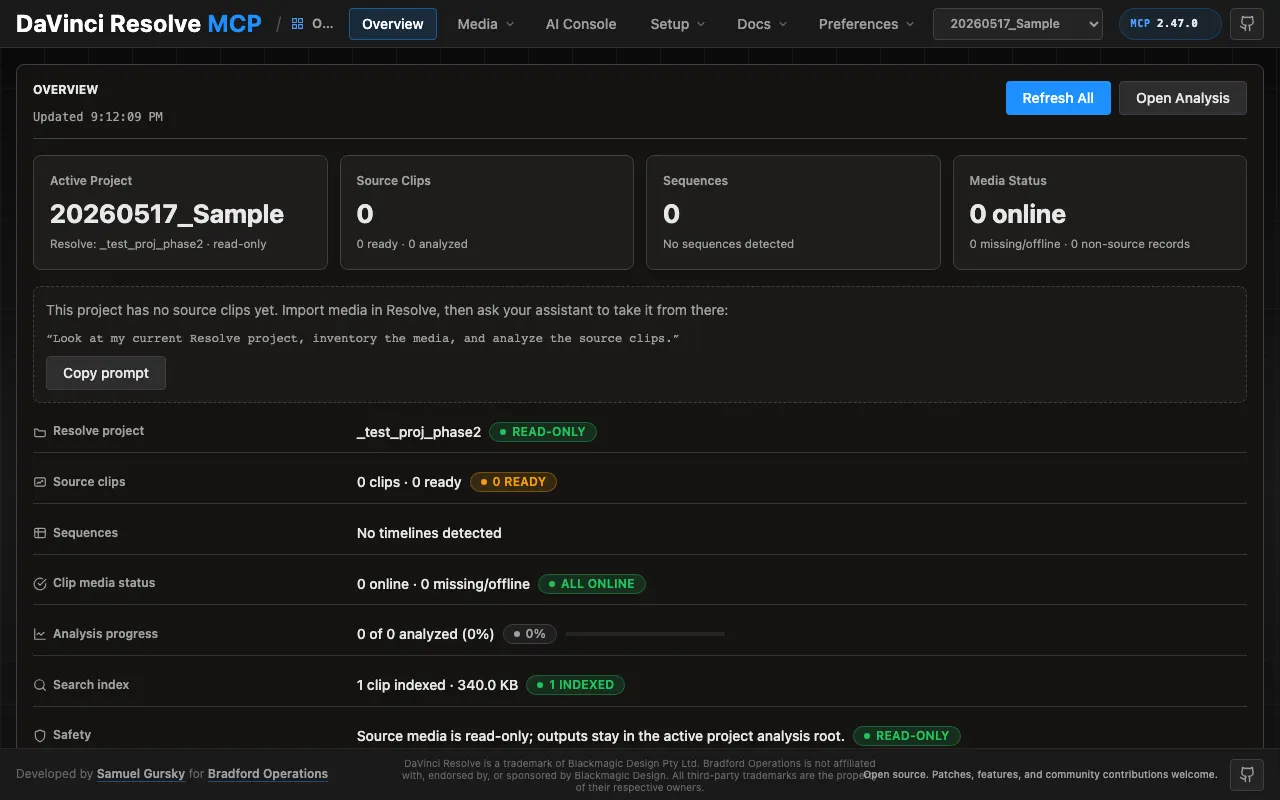
Ảnh từ README của tác giảBảng điều khiển cục bộ hiển thị trạng thái dự án và phân tích phương tiện
Ảnh từ README của tác giả samuelgursky ·Nguồn
Bạn có thể làm gì với nó
- Tự động hóa các tác vụ chỉnh sửa video định kỳ trong DaVinci Resolve.
- Tổ chức các đoạn phương tiện và tạo dòng thời gian dự án bằng các lệnh AI.
- Thiết lập cấu hình render và bắt đầu xuất một cách lập trình.
Kiểm tra an toàn
Không thấy dấu hiệu rủi ro trong các file đã quét.
Quét tự động các file trong repo. Luôn xem lại code trước khi chạy.
Trích từ README
DaVinci Resolve MCP Server
English | 简体中文
-blue.svg) -18%20tools-blueviolet.svg)
A Model Context Protocol (MCP) server that lets AI assistants control DaVinci Resolve Studio through the official Scripting API. It provides full API coverage plus guarded workflow helpers for editing, media pool organization, render setup, review markers, grading, Fusion, Fairlight, project lifecycle tasks, extension authoring, and source-safe media analysis.
A local browser control panel ships with the server for inspecting Resolve state, running source-safe analysis, drilling into analyzed clips and shots, and editing analysis output inline. See the Control Panel Guide for the full tour.
Quick Start
npx davinci-resolve-mcp setup
Before connecting, open DaVinci Resolve Studio and set Preferences > General > External scripting using to Local. (On the free edition that preference does not help — see Free edition below.) The npm launcher installs a managed copy under your user application-data directory, then runs the universal Python installer. The installer creates a virtual environment, detects Resolve paths, and can configure Claude Desktop, Claude Code, Cursor, VS Code, Windsurf, Zed, Continue, Cline, Roo Code, OpenCode, Codex CLI, and JetBrains IDEs.
For source installs:
git clone https://github.com/samuelgursky/davinci-resolve-mcp.git
cd davinci-resolve-mcp
python install.py
For platform paths, client-specific config, and manual setup, see Installation and Configuration.
The installer and server check the latest GitHub release for MCP updates. Checks are best-effort and throttled; the server never blocks MCP startup for a prompt. The installer can prompt, snooze, ignore a release, disable checks, or apply an opt-in safe auto-update for clean git checkouts.
Free edition (in-app bridge)
Blackmagic gates external scripting to Studio: on the free edition
scriptapp("Resolve") refuses a foreign process, whatever the preference says.
Through Resolve 21.0.x the Workspace ▸ Scripts menu was not gated — a script
launched from it is handed the live resolve object (measured on free 21.0.3.7) —
so the server can reach the free edition through a small script that runs inside
Resolve and re-exports it over an authenticated loopback listener. Resolve 21.1
moved Python scripting to Studio. On free 21.1 the Scripts menu no longer lists
.py files at all (reported on Fedora 44 in #203; a Lua script in the same folder
lists normally). Whether the Console still runs Python there is unconfirmed, so
treat the bridge as a 21.0.x path until that is measured.
python scripts/install_resolve_bridge.py
# restart Resolve, open a project, then: Workspace > Scripts > resolve_bridge
The installer and MCP client use ~/.config/davinci-resolve-mcp/bridge.json
by default. To keep the authenticated bridge config elsewhere, set
DAVINCI_RESOLVE_BRIDGE_CONFIG while running the installer and in the MCP
client environment; both sides will use that path.
Once that listener is running it is used automatically whenever external
scripting is unavailable — no environment variable required. Setting
DAVINCI_RESOLVE_BRIDGE=1 forces the bridge instead: it becomes the only
transport tried, so a bridge that stops answering reports its own fault rather
than quietly falling back to another transport. Use it when the bridge is the
path you intend to depend on.
On macOS, Resolve looks for Python 3 in exactly two places: the
PYTHON3HOME environment variable, then /usr/local/bin/python3. Homebrew,
pyenv, uv and conda land in neither, so the script silently never appears in the
menu. A python.org install works because its installer creates
/usr/local/bin/python3 — but you do not need one: point Resolve at the
interpreter you already have, no sudo required.
launchctl setenv PYTHON3HOME "$(python3 -c 'import sys; print(sys.prefix)')"
Use launchctl setenv, not export — Resolve is launched from the Dock and
never sees your shell's environment. Restart Resolve afterwards. A Lua canary is
installed alongside so you can tell "Python not detected" apart from a wrong
folder.
Two things that bite (#182). The prefix must contain both
lib/libpython3.X.dylib and bin/python3 under that exact unversioned
name — Homebrew's framework builds often ship only bin/python3.13, which is
half a Python as far as Resolve is concerned, and the installer's preflight now
says so instead of reporting a usable prefix. And launchctl setenv does not
survive a reboot; if scripts stop listing weeks later with no error, that is
why. For something persistent, put an interpreter where Resolve already looks
(this one needs sudo, and check that /usr/local/bin does not precede your
normal Python on PATH):
sudo ln -s "$(command -v python3)" /usr/local/bin/python3
Validated on free 21.0.3.7 and Studio 19.1.3.7, both macOS. The Windows paths
added in v2.70.1 (issue #106) shipped unverified; reports on free 21.0.1.11
(issue #109) and free 21.0.3.7 (issue #112) have since shown the bridge
installing, listing and serving from both %PROGRAMDATA% and %APPDATA% on
Windows 11, so those paths are now confirmed rather than assumed. Linux is
confirmed as well: a report on free 20.3.2.9 (issue #129, Fedora 43) shows the
bridge installing to ~/.local/share/DaVinciResolve/Fusion/Scripts/Utility,
listing against the system Python — Linux has none of this discovery problem —
and serving end-to-end. No platform now rests on an assumption: macOS was
validated directly, Windows and Linux on user reports.
Note that the bridge holds its port for as long as it serves. Before v2.70.3 a Windows bridge could outlive Resolve and block the next session's listener; if you are on an older build and a bridge stops answer