claude-code-router
musistudio · musistudio/claude-code-router
Cung cấp một mặt phẳng điều khiển cục bộ để định tuyến, điều phối và quan sát các yêu cầu trên nhiều agent AI và mô hình từ một ứng dụng.
One local control plane for every AI agent: route across models, fuse new capabilities, orchestrate tools, and stay fully in control.
Xem kết quả thực tế
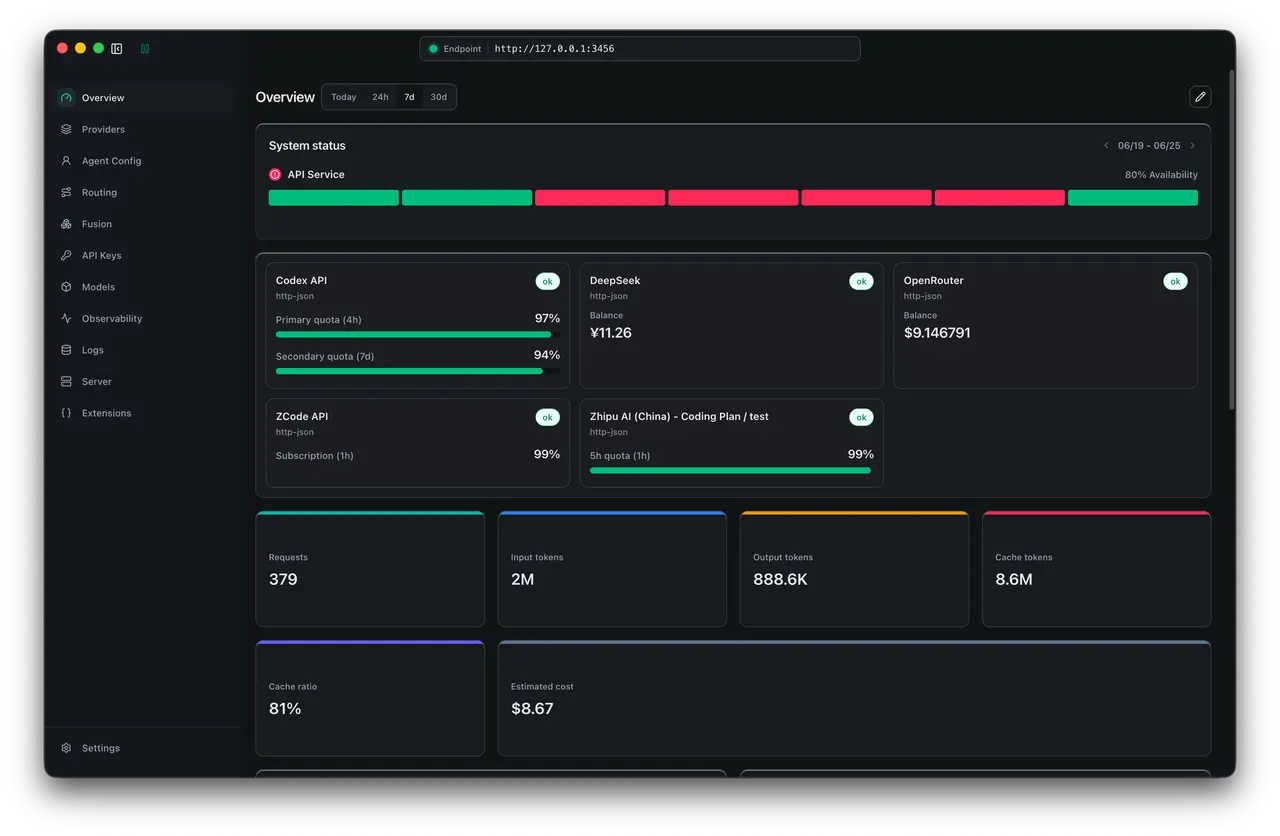
Ảnh từ README của tác giảBảng điều khiển Claude Code Router hiển thị trạng thái và các chỉ số sử dụng
Ảnh từ README của tác giả musistudio ·Nguồn
Bạn có thể làm gì với nó
- Định tuyến các yêu cầu của agent mã hóa tới các nhà cung cấp LLM khác nhau dựa trên chi phí hoặc hiệu suất.
- Tạo quy tắc dự phòng để chuyển đổi mô hình nếu một mô hình không khả dụng.
- Giám sát việc sử dụng và chi phí của tất cả các tương tác agent AI của bạn từ một bảng điều khiển duy nhất.
Thử hỏi agent của bạn
- “Cấu hình Claude Code Router để ưu tiên Gemini cho việc tạo mã, nhưng sử dụng OpenAI nếu Gemini không khả dụng.”
- “Cho tôi xem bảng phân tích chi phí và việc sử dụng token cho tất cả các yêu cầu agent mã hóa trong 24 giờ qua thông qua bảng điều khiển CCR.”
- “Định tuyến tác vụ tái cấu trúc này thông qua mô hình có độ trễ thấp nhất hiện có trong thiết lập CCR của tôi.”
Kiểm tra an toàn
Không thấy dấu hiệu rủi ro trong các file đã quét.
Quét tự động các file trong repo. Luôn xem lại code trước khi chạy.
Trích từ README
Kimi Code plan (中文站 | Global) · API (中文站 | Global)
    <strong>Thanks to Kimi for sponsoring this project!</strong> Kimi K3 is Moonshot AI's most capable model and the world's first open 3T-class model. With 2.8 trillion parameters, native vision, and a 1-million-token context window, K3 delivers frontier performance across long-horizon coding, knowledge work, and reasoning. Inside CCR, Kimi ships as a built-in provider preset: import the pay-as-you-go API or Kimi Code subscription in one click and route your coding agent's requests to Kimi. The subscription endpoint passes through natively without protocol conversion, API endpoints are adapted automatically, and account balance and subscription usage are visible in the CCR dashboard.


    CCR already includes Kimi provider presets. Visit the Kimi Open Platform (中文站 | Global) to try the <strong>API</strong>, or explore the <strong>Kimi Code plan</strong> (中文站 | Global).
Claude Code Router
Manage every agent and provider from one place.
Connect Claude Code, Claude Design, Codex, Grok CLI, Kimi CLI, Kilo Code, OpenCode, Pi, ZCode, WorkBuddy, and compatible API clients to the providers you choose—then route, fail over, extend, and observe every request from one app.
Why use Claude Code Router?
Claude Code Router (CCR) is a local model gateway and control plane for coding agents. It gives Claude Code, Claude Design, Codex, Grok CLI, Kimi CLI, Kilo Code, OpenCode, Pi, ZCode, WorkBuddy, and compatible API clients one stable local endpoint, while you manage the providers, models, accounts, routing rules, and tools behind it from one place.
Use CCR to:
- Manage all agents and providers together instead of maintaining a separate model configuration for every client.
- Switch providers or models without changing your workflow or repeatedly editing agent configuration files.
- Keep requests running with retries, credential pools, key rotation, and ordered fallback models.
- Add capabilities to existing models with Fusion vision, web search, MCP tools, and ToolHub.
- See what actually happened through request logs, resolved routes, latency, token usage, cost estimates, and account status.
CCR supports OpenAI Chat / Responses, Anthropic Messages, Gemini Generate Content / Interactions, OpenRouter, DeepSeek, SiliconFlow, Moonshot, Kimi Code, Mistral, Z.AI, Bailian, and custom compatible providers.
Supported Agents
    <strong>Claude Code (CLI & APP)</strong>


    <strong>Codex (CLI & APP)</strong>


    <strong>Grok CLI (CLI)</strong>


    <strong>Kimi CLI (CLI)</strong>


    <strong>Kilo Code (CLI)</strong>


    <strong>OpenCode (CLI & APP)</strong>


    <strong>Pi (CLI)</strong>


    <strong>ZCode (APP)</strong>


    <strong>Claude Design (APP)</strong>


    <strong>WorkBuddy (APP)</strong>
Quick Start
Desktop app (recommended)
-
Download Claude Code Router for macOS, Windows, or Linux, then launch the app.
<strong>Windows</strong> <strong>Linux</strong> <strong>macOS (Apple Silicon)</strong> <strong>macOS (Intel)</strong> -
Open Providers → Add Provider. Choose a built-in preset or a custom endpoint, enter the API key, select the protocol and models, then save.
-
Open Server and click Start. The local model gateway listens on
http://127.0.0.1:3456by default. -
Open Agent Config, choose Claude Code, Claude Design, Codex, Grok CLI, Kimi CLI, Kilo Code, OpenCode, Pi, ZCode, or WorkBuddy, select a model, and apply the profile.
-
Start using your agent. Open Logs to confirm the resolved provider, model, status, tokens, latency, and errors.
Your agent is now connected to CCR. To add conditions, retries, request rewrites, or fallback models, open Routing.
CLI
The npm CLI requires Node.js 22 or newer. It starts the same gateway and a browser-based management UI without Electron:
npm install -g @musistudio/claude-code-router
ccr ui
Open http://127.0.0.1:3458, then follow the same Providers → Server → Agent Profiles flow above. The model gateway remains at http://127.0.0.1:3456. See the CLI reference for service modes, authentication, and profile commands.
Docker
npm run docker:compose:up
Docker exposes the management UI and gateway routes through http://127.0.0.1:3458 by default. The npm script prepares the local plugin-capable ai-gateway runtime before building the image when ../../next-ai/gateway exists. Read the Docker deployment guide before exposing CCR remotely.
Build desktop apps
Install Node.js 22+, then run npm ci.
| Target | Command | Output |
|---|---|---|
| macOS local DMG/ZIP | npm run build:app:mac | release-local/ |
| Windows local NSIS installer | npm run build:app:win | release-local/ |
Windows app packaging must run on Windows x64 because better-sqlite3 ships a native Electron module. The release workflow builds macOS on macOS runners and Windows on `win