FinanceToolkit
JerBouma · JerBouma/FinanceToolkit
Cung cấp bộ công cụ mã nguồn mở và MCP server để phân tích tài chính minh bạch, với hơn 500 phương pháp cho dữ liệu tài chính.
Transparent and Efficient Financial Analysis
Xem kết quả thực tế
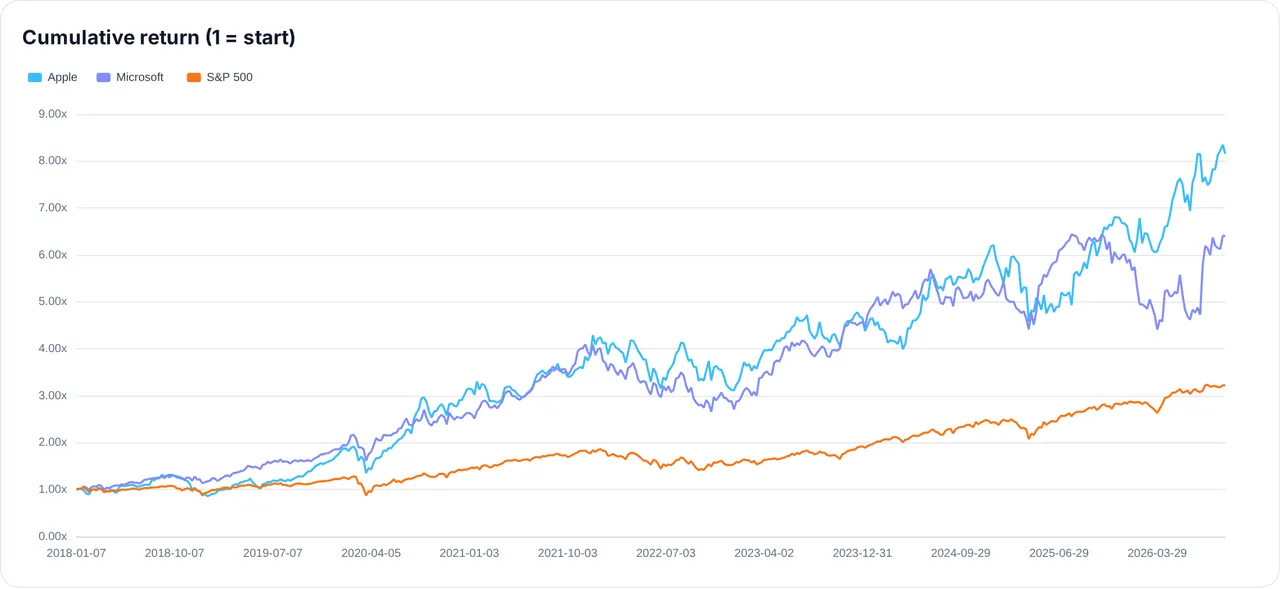
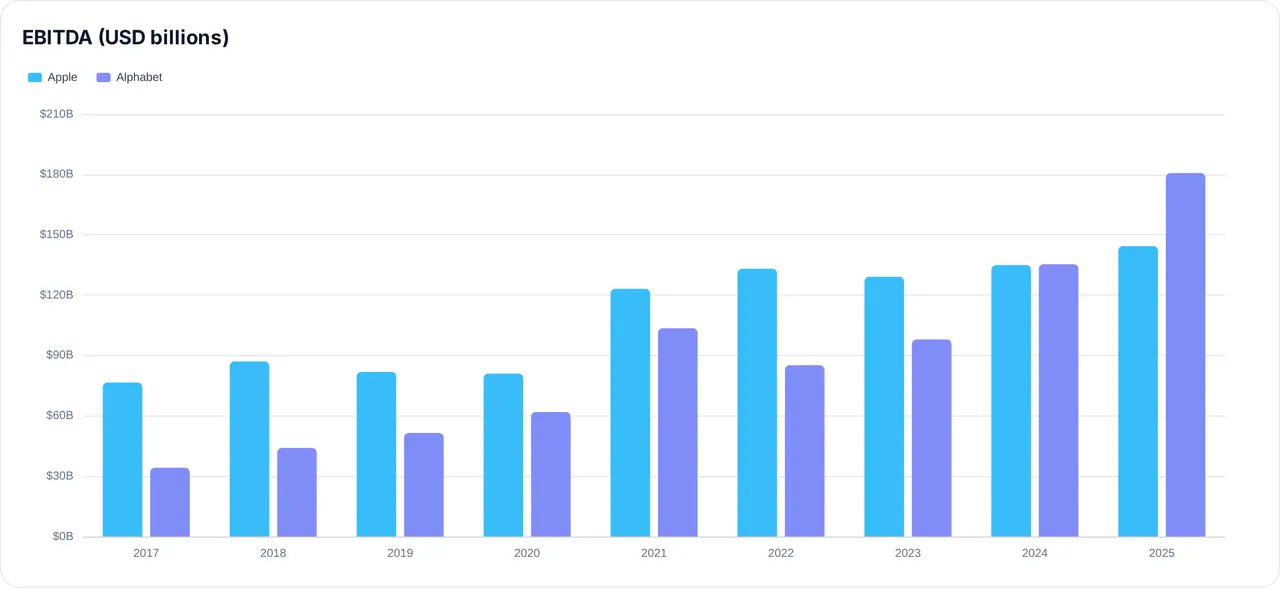
Ảnh từ README của tác giảBiểu đồ đường về lợi nhuận tích lũy của Apple, Microsoft và S&P 500
Ảnh từ README của tác giả JerBouma ·Nguồn
Bạn có thể làm gì với nó
- Truy vấn dữ liệu tài chính thời gian thực cho các công ty hoặc thị trường cụ thể thông qua một agent.
- Thực hiện phân tích cơ bản chuyên sâu bằng cách sử dụng hơn 500 chỉ số tài chính một cách lập trình.
- Phát triển các chiến lược giao dịch thuật toán dựa trên các tính toán tài chính minh bạch.
Kiểm tra an toàn
Không thấy dấu hiệu rủi ro trong các file đã quét.
Quét tự động các file trong repo. Luôn xem lại code trước khi chạy.
Trích từ README
While browsing a variety of websites, I repeatedly observed significant fluctuations in the same financial metric among different sources. Similarly, the reported financial statements often didn't line up, and there was limited information on the methodology used to calculate each metric.
For example, Microsoft's Price-to-Earnings (PE) ratio on the 6th of May, 2023 is reported to be 28.93 (Stockopedia), 32.05 (Morningstar), 32.66 (Macrotrends), 33.09 (Finance Charts), 33.66 (Y Charts), 33.67 (Wall Street Journal), 33.80 (Yahoo Finance) and 34.4 (Companies Market Cap). All of these calculations are correct, however the method of calculation varies leading to different results. Therefore, collecting data from multiple sources can lead to wrong interpretation of the results given that one source could apply a different definition than another. And that is, if that definition is even available as often the underlying methods are hidden behind a paid subscription.
This is why I designed the FinanceToolkit, this is an open-source toolkit in which all relevant financial methods (500+) are written down in the most simplistic way allowing for complete transparency of the method of calculation (proof). This enables you to avoid dependence on metrics from other providers that do not provide their methods. With a large selection of financial statements in hand, it facilitates streamlined calculations, promoting the adoption of a consistent and universally understood methods and formulas.
Beyond Equities, it supports Options, Currencies, Cryptocurrencies, ETFs, Mutual Funds, Indices, Money Markets, Commodities, Key Economic Indicators and more, allowing you to obtain historical data as well as important performance and risk measurements such as the Sharpe Ratio and Value at Risk.
Complementing this is the Finance Database 🌎, a database featuring 300.000+ symbols containing Equities, ETFs, Funds, Indices, Currencies, Cryptocurrencies and Money Markets. By utilising both, it is possible to do a fully-fledged competitive analysis with the tickers found from the FinanceDatabase inputted into the FinanceToolkit.
🔌 The Finance Toolkit is also available as an MCP Server
Query 500+ methods from Claude, Copilot, Cursor, Windsurf or any MCP-compatible client without writing code.
- Hosted: connect to
https://financetoolkit.jeroenbouma.com/mcp— OAuth handles the rest on first use. - Local:
uvx --from "financetoolkit[mcp]" financetoolkit-mcp-setup— sets up your client config and API key automatically. See MCP Server Documentation for manual setup.
Also on Smithery, Glama, MCP Servers and more.
Table of Contents
Installation
Before installation, consider starring the project on GitHub which helps others find the project as well.
To install the Finance Toolkit it simply requires the following:
pip install financetoolkit -U
Then within Python use:
from financetoolkit import Toolkit

companies = Toolkit(
    tickers=['AAPL', 'MSFT'],
    api_key="FINANCIAL_MODELING_PREP_KEY",  # replace with your actual API key
)
To be able to get started, you need to obtain an API Key from FinancialModelingPrep. This is used to gain access to 30+ years of financial statement both annually and quarterly. Note that the Free plan is limited to 250 requests each day, 5 years of data and only features companies listed on US exchanges.
Obtain an API Key from FinancialModelingPrep here.
Through the link you are able to subscribe for the free plan and also premium plans at a 15% discount. This is an affiliate link and thus supports the project at the same time. I have chosen FinancialModelingPrep as a source as I find it to be the most transparent, reliable and at an affordable price. I have yet to find a platform offering such low prices for the amount of data offered. When you notice that the data is inaccurate or have any other issue related to the data, note that I simply provide the means to access this data and I am not responsible for the accuracy of the data itself. For this, use their contact form or provide the data yourself.
By default, the Finance Toolkit prioritizes Financial Modeling Prep for data retrieval. If data acquisition from Financial Modeling Prep is unsuccessful (e.g., due to plan restrictions or API key issues), the toolkit automatically switches to Yahoo Finance as a secondary source. To disable this fallback behavior and exclusively use Financial Modeling Prep, set enforce_source="FinancialModelingPrep" during Toolkit initialization. This configuration ensures that an error is raised if Financial Modeling Prep data cannot be accessed. Alternatively, you can set enforce_source="YahooFinance" to exclusively use Yahoo Finance as the data source.
The same enforce_source argument is also accepted per call on get_historical_data, get_treasury_data and the four statement functions (get_balance_sheet_statement, get_income_statement, get_cash_flow_statement and get_statistics_statement), where it overrides whatever the Toolkit was initialised with.
Functionality
This section is an introduction to the Finance Toolkit. Find with the l