humanizer
blader · blader/humanizer
Kỹ năng agent này viết lại văn bản do AI tạo ra để nghe tự nhiên như văn bản của con người, giữ nguyên ý nghĩa trong khi loại bỏ các dấu hiệu AI phổ biến dựa trên hướng dẫn của Wikipedia.
Skill cho tác nhân giúp loại bỏ các dấu hiệu văn bản do AI tạo ra khỏi văn bản
Xem kết quả thực tế
Chạy thật trên Airsc
Việc giao: “Viết lại năm câu tóm tắt mà Curator của Airsc viết bằng AI, chỉ dùng thông tin có trong từng repo.”
Claude Code · Opus 5.5 · 2026-10-09
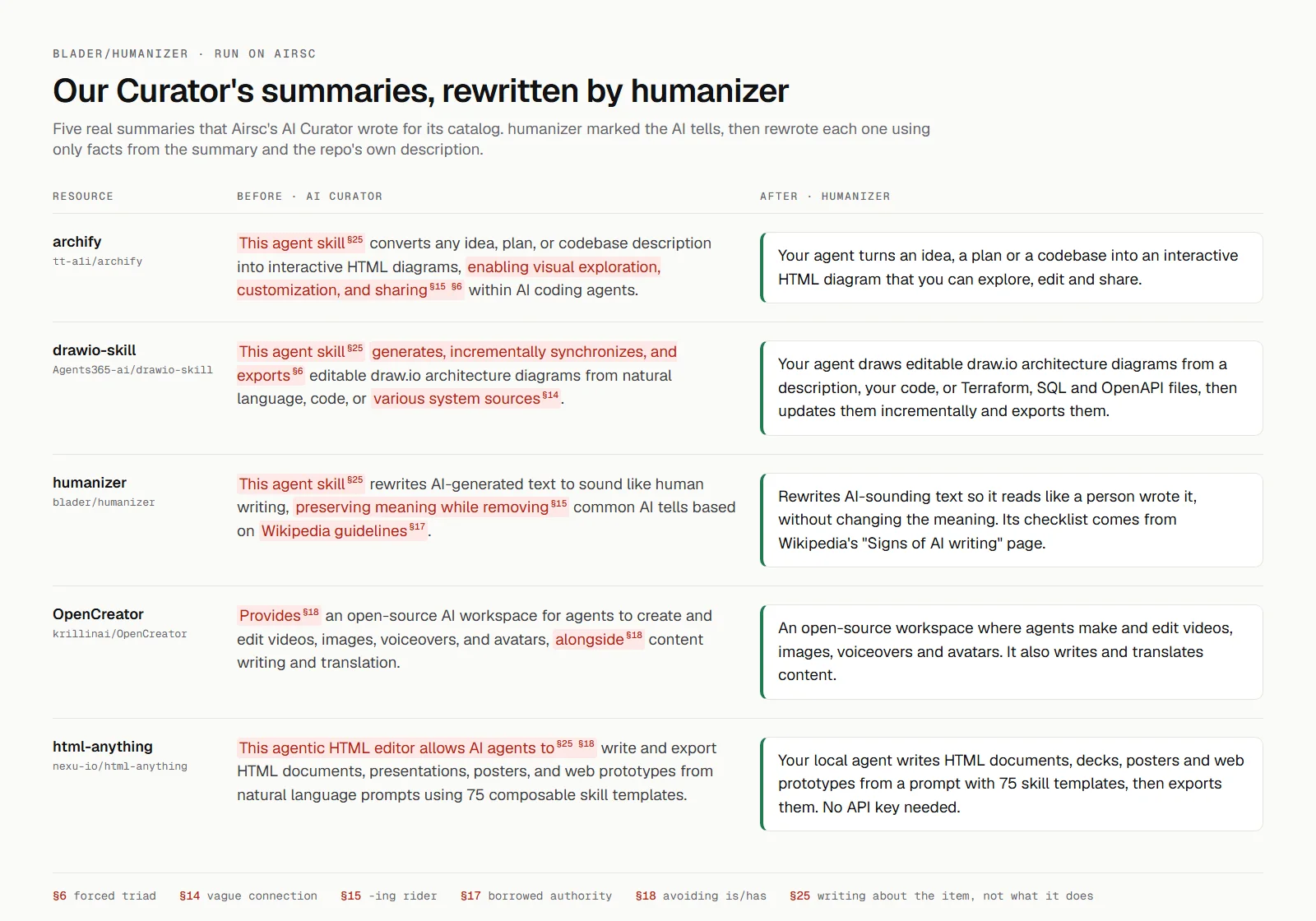
Chạy thật trên AirscTrước và sau, mỗi dấu hiệu văn AI được đánh số theo mẫu trong skill
Bạn có thể làm gì với nó
- Làm cho báo cáo của agent AI của bạn nghe có vẻ cá nhân hơn và ít máy móc hơn.
- Tinh chỉnh nội dung tiếp thị do LLM tạo ra để có cảm giác gần gũi hơn với con người.
- Đảm bảo các bài đăng blog hoặc bài viết do AI viết có giọng văn tự nhiên và hấp dẫn.
Thử hỏi agent của bạn
- “Viết lại đoạn nội dung marketing sau để nghe cá nhân hơn và ít giống AI hơn: [Dán nội dung vào đây]”
- “Sử dụng `/humanizer:humanizer` cho đoạn văn này để loại bỏ các cụm từ máy móc: 'I am pleased to inform you that the new feature has been implemented successfully.'”
- “Bài đăng blog của tôi nghe quá trang trọng. Bạn có thể làm cho nó tự nhiên hơn mà vẫn giữ nguyên thông điệp gốc không? [Dán bài đăng blog]”
Kiểm tra an toàn
Không thấy dấu hiệu rủi ro trong các file đã quét.
Quét tự động các file trong repo. Luôn xem lại code trước khi chạy.
Trích từ README
Humanizer
Humanizer makes AI-written text sound like a person wrote it, without changing what it says. It is built on Wikipedia's Signs of AI writing, the guide Wikipedia editors use to catch AI-generated text, and it works in Claude Code, Codex, and any other agent that supports skills.
Before:
I'm thrilled to announce that shared drafts are finally here! 🚀 For months, our own team was drowning in files named final_v7.docx — and we knew there had to be a better way. Now two people can edit the same doc at once, with every change appearing live for both of them. It's not just a feature; it's a whole new way to collaborate. Comments stay anchored to the exact sentence they reference, even as the text around them evolves. And the best part? It's available today on every plan, completely free. Let that sink in.
After:
Shared drafts are out today. For months our own team passed around files named final_v7.docx, so we built a way for two people to edit the same doc at once, with each person's changes showing up live for the other. Comments stay pinned to the sentence they're about, even when the text around them changes. It's free on every plan.
In a blind test, judges preferred Humanizer's rewrite over the original AI text 16 times out of 16 (#229).
Humanizer edits for human readers. Getting past AI detectors is not a goal, and detectors still flag most of its output.
The five strongest tells
These are the most common signs of AI writing, and Humanizer rewrites any of them on sight:
- Not X but Y: "It's not just a feature, it's a shift."
- One-line closers: "Let that sink in."
- Sayings that sound deep: "At its core, what really matters is..."
- A staged run-up: "Here's the thing." "Honestly?"
- Arguing with no one: "I'm not saying X, but..."
Humanizer checks for 26 patterns in all.
Installation
Once installed, the skill answers to /humanizer.
Claude Code
/plugin marketplace add blader/humanizer
/plugin install humanizer@humanizer
The plugin answers to /humanizer:humanizer. It needs Claude Code 2.1.142 or newer; on older versions, use npx skills add blader/humanizer --global --agent claude-code.
Codex
npx skills add blader/humanizer --global --agent codex
Claude.ai and Claude Desktop
Download this repository as a ZIP (Code → Download ZIP) and upload it as a skill in Settings.
Other agents
npx skills add blader/humanizer --global --agent '*'
This installs Humanizer for every agent the Skills CLI supports, including Gemini CLI, GitHub Copilot, and Windsurf. Leave off --global in any command above to install it only in the current project. For an agent the Skills CLI does not know, copy SKILL.md into its skill folder.
Usage
Call the skill directly:
/humanizer

[paste your text here]
Or ask in plain language:
Please humanize this text: [your text]
To rewrite a file, give Humanizer its path:
Humanize the prose in docs/launch-post.md
Match your voice
If you want the rewrite to sound more like you, include a sample:
/humanizer

Here's a sample of my writing for voice matching:
[paste 2-3 paragraphs of your own writing]

Now humanize this text:
[paste AI text to humanize]
Humanizer follows the sample's rhythm, word choice, punctuation, and deliberate quirks, including dashes if you use them.
How it works
A language model writes whatever is most likely to come next, so by default it makes the choice that fits the widest range of readers and subjects. A person chooses for one reader and one subject. Every tell Humanizer looks for is a form of that default choice: a sentence that signals importance instead of adding a fact, rhythm or formatting applied by rule, an ordinary fact dressed as a pivotal one, text left over from the chat, or a reply that re-explains what the reader already knows.
"LLMs use statistical algorithms to guess what should come next. The result tends toward the most statistically likely result that applies to the widest variety of cases." Wikipedia, "Signs of AI writing"
Humanizer marks every tell it finds, strongest first. It drafts a rewrite without treating the original structure as fixed, checks the draft against the patterns and the original claims, and then writes the final version. It does not make things up. A name, number, date, quote, citation, or other factual detail must come from the source or the writer, and if a sentence needs a detail that is missing, Humanizer asks instead of inventing one.
When you paste text, Humanizer shows its work: the first rewrite, a short critique of anything that still sounds artificial, and the final version. Point it at a file and it changes only the prose, leaving code, data, frontmatter, and link targets alone. Personal writing keeps the writer's opinions and quirks. Technical and reference prose stays neutral and plain.
The 26 patterns
The patterns are numbered by strength and frequency. The first five justify an edit on a single sighting. Patterns marked weak alone count only when several tells share a passage, because a careful writer may use any one of them on purpose.
A. Staging instead of stating
| # | Pattern | Before | After |
|---|---|---|---|
| 1 | Not X but Y | "It's not just X, it's Y", "This doesn't mean X. It means Y." | State the point directly |
| 2 | One-line closers and dramatic fragments | "That is the real win." after every section; "This shows the importance of..." after an example; "No prior. No nostalgia." | Cut the closer that repeats or explains the example; merge fragments into a specific claim |
| 3 | Sayings that sound deep | "At its core, what matters is...", "Symmetry is the langu |