hive
aden-hive · aden-hive/hive
Công cụ quản lý tác nhân này cung cấp môi trường chạy độc lập với mô hình để quản lý các nhóm tác nhân AI, cho phép thực thi quy trình kinh doanh phức tạp một cách đáng tin cậy và có thể mở rộng.
Khai thác Multi-Agent cho AI sản xuất
Xem kết quả thực tế
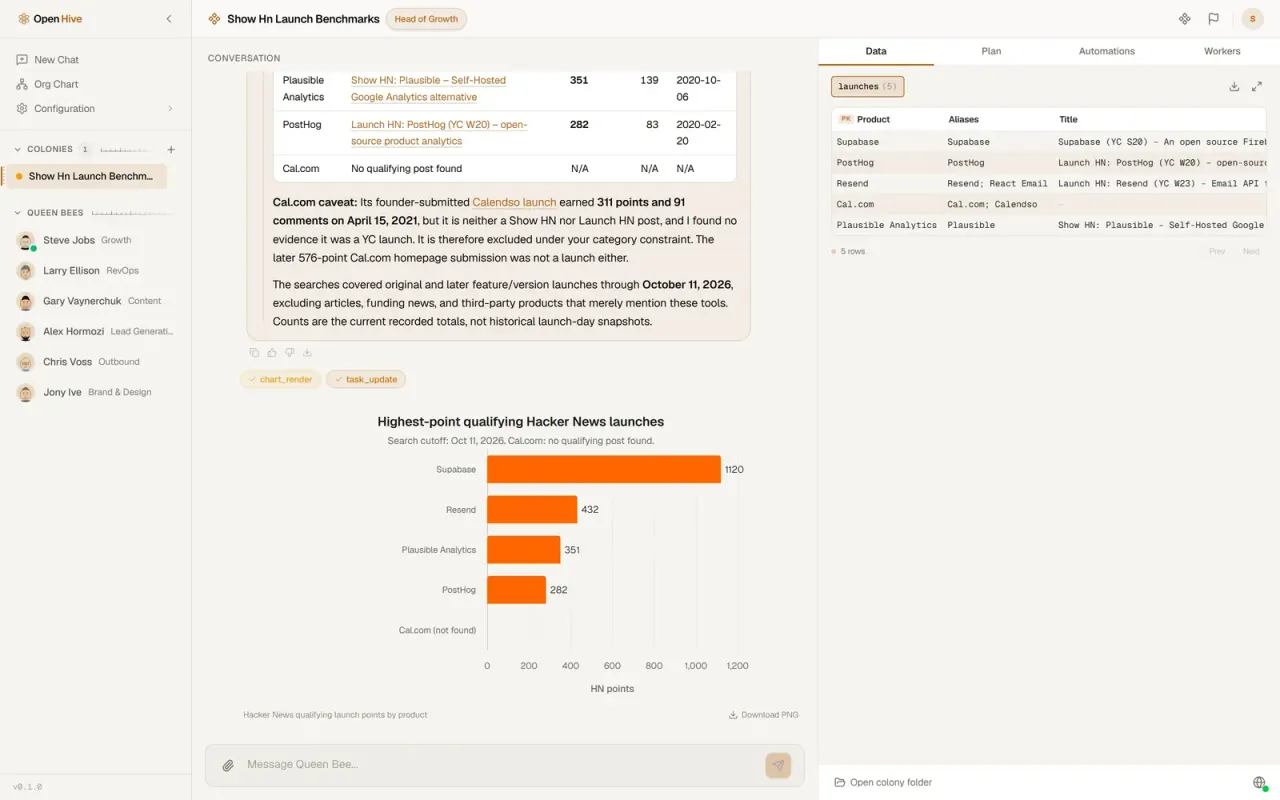
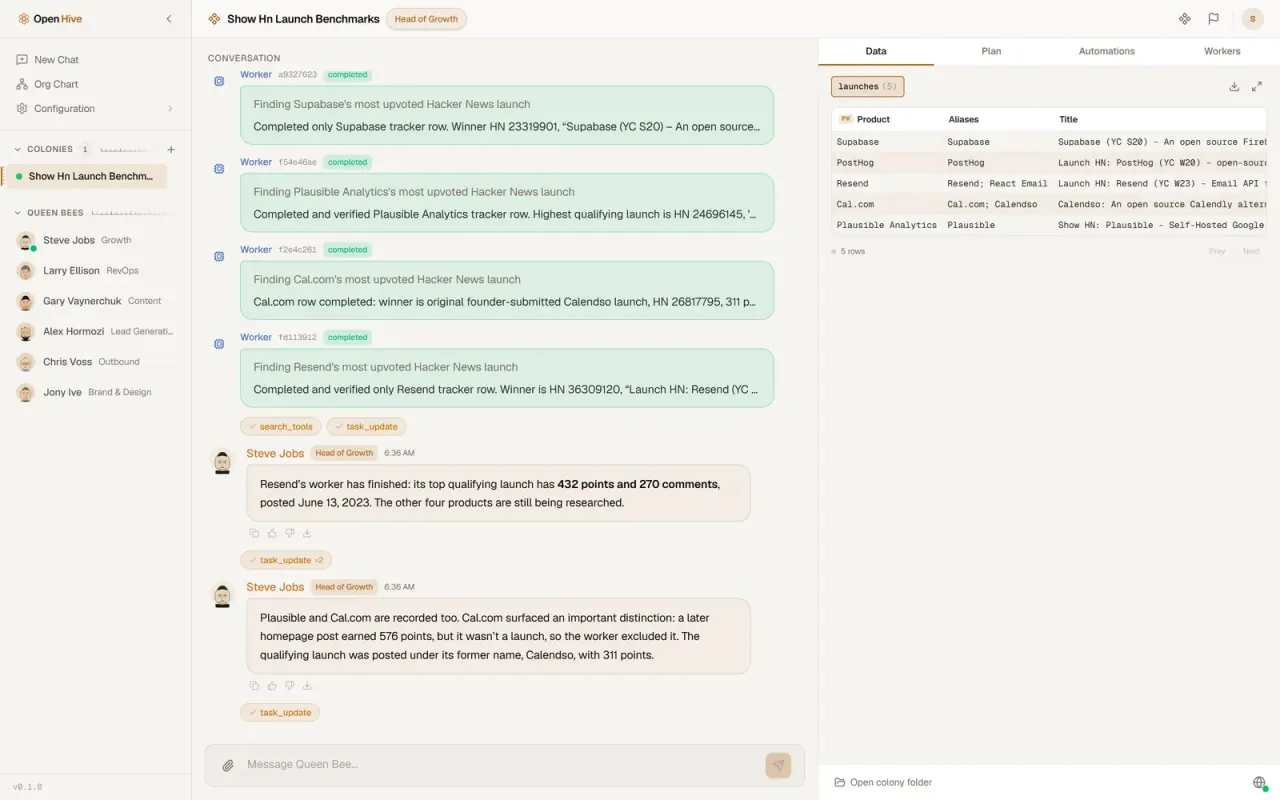
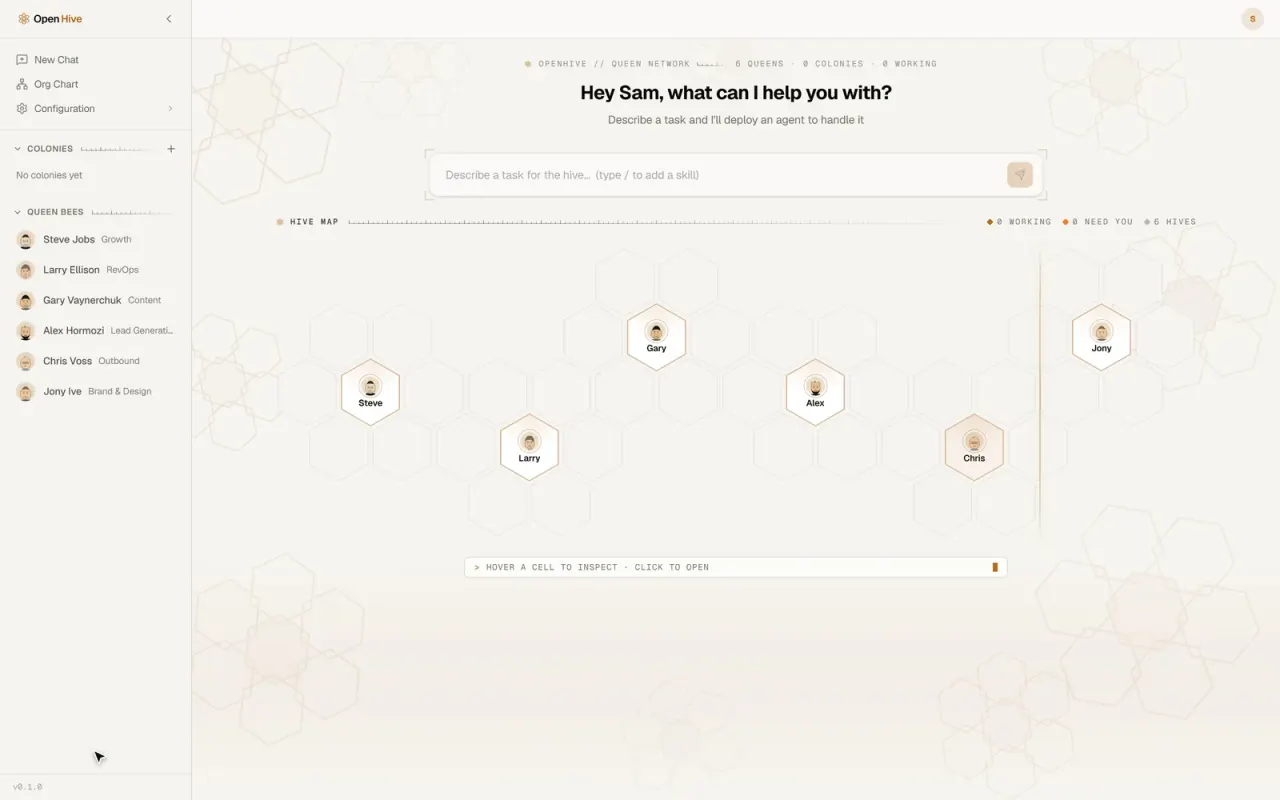
Ảnh từ README của tác giảKết quả đầu ra của tác nhân gồm biểu đồ dữ liệu và bảng tổng hợp
Ảnh từ README của tác giả aden-hive ·Nguồn
Bạn có thể làm gì với nó
- Điều phối một nhóm tác nhân AI để xử lý toàn bộ các yêu cầu hỗ trợ khách hàng.
- Phát triển một hệ thống đa tác nhân để phân tích dữ liệu tự động và tạo báo cáo.
- Triển khai một quy trình làm việc mạnh mẽ cho việc tạo nội dung từ ý tưởng ban đầu đến xuất bản cuối cùng.
Kiểm tra an toàn
Không thấy dấu hiệu rủi ro trong các file đã quét.
Quét tự động các file trong repo. Luôn xem lại code trước khi chạy.
Trích từ README
English | 简体中文 | Español | हिन्दी | Português | 日本語 | Русский | 한국어
An open-source runtime for colonies of AI agents that do real business work.
Tell a queen agent what you need. She does the first piece herself to learn what the job takes, then hands the rest to as many parallel workers as it needs. Every result lands in a shared tracker you can query, audit and resume from.
A real run. Only the typing and the waiting are sped up, and the badge says by how much. Watch the full run (MP4).
What you just watched
A growth team preparing a Show HN wants to know how five developer tools' own launches did on Hacker News. Here's what Hive did with that one message:
- You hand it to a queen. Queens are long-lived agents with a role (here, Head of Growth) and their own memory and tools.
- She asks the one question that changes the answer: every launch post, or only each product's original launch? You pick every launch, and she carries on.
- She proposes a colony, and you approve it. Five products means five parallel jobs, so the chat becomes a colony: the queen plus as many worker agents as the work needs.
- She does one herself. She takes PostHog first, works out what counts as a genuine launch post rather than a passing mention, checks the numbers against the Hacker News API, and saves the method as a reusable skill.
- She fans out. A playbook starts one worker per product. Each follows her skill and writes its result to the colony's tracker, a shared SQLite table.
- She checks every row before she answers, and fixes one. Cal.com's worker counted a post from its old name, Calendso, but that post wasn't a Show HN, Launch HN or YC launch. She clears the row, and the chart shows Cal.com as not found rather than zero.
None of this was wired up in advance. There's no workflow graph to draw: the queen shapes the colony as the work unfolds, and a tracker on disk, not a context window, keeps count of what's done and what's left.
Quick start
You'll need Python 3.11+, Node.js 20+ and git. The quickstart installs uv and ripgrep if they're missing, and offers to install Node.
And a model. The quickstart sets up any of these:
- an API key from Anthropic, OpenAI, Google Gemini, Groq, Cerebras or OpenRouter
- a coding subscription you already pay for: Claude Code, OpenAI Codex, Kimi Code, MiniMax, Z.AI or Antigravity
- Hive LLM
- a local model through Ollama, with no key at all
git clone https://github.com/aden-hive/hive.git
cd hive
./quickstart.sh          # macOS / Linux
.\quickstart.ps1         # Windows (PowerShell 5.1+)
The quickstart creates a single Python environment for the workspace, stores your API key encrypted under ~/.hive, asks which model to use, builds the dashboard and opens it at http://127.0.0.1:8787. Next time, run hive open from the repository.
[!NOTE] Hive is a
uvworkspace, not a pip package.pip install -e .installs a placeholder that won't run; use the quickstart.
Then type a task on the home screen and choose the queen to give it to, or open the Prompt Library and send a ready-made prompt straight to the queen it was written for.
How it works
flowchart LR
    You(["You"]) -->|"describe the outcome"| Queen["Queen(persistent agent)"]
    Queen -->|"proposes a colony,you approve"| Pilot["Pilot(one unit, done by the queen)"]
    Pilot -->|"saves the method"| Skill["Skill + playbook"]
    Skill -->|"run_worker / run_playbook"| W["Worker clonesin parallel"]
    W -->|"tracker_upsert"| T[("Trackershared SQLite")]
    T -->|"SQL: what's done,what's left"| Queen
    Queen -->|"checked answer"| You

    style Queen fill:#ffb100,stroke:#cc5d00,color:#333
    style T fill:#fff3d6,stroke:#cc5d00,color:#333
    style W fill:#ff9800,stroke:#cc5d00,color:#fff
Hive has one execution primitive: the agent loop. The queen is one, and every worker is a clone of it with its own task, a narrower set of tools and a strict budget. Orchestration is a tool call, not a compiled graph:
run_workerfans tasks out and returns at once, so the queen keeps talking to you while workers run. Four run at a time by default; the rest wait their turn. Each worker's report arrives in the queen's conversation as a new turn.- The tracker is the colony's shared state. The queen defines the table and which columns workers may write, workers upsert one row per unit of work, and the queen checks progress with SQL. It's a file on disk:
~/.hive/colonies/<name>/tracker/tracker.db. run_playbookruns a proven method over every row, with retries and backoff, rate-limited lanes, and a dead-letter list for rows that keep failing. "What's left" is always a fresh query of the tracker, so re-running a playbook picks up where it stopped.
The architecture overview goes deeper: the loop, the tool surface, memory, human oversight, and how state survives a crash.
<b>Home.</b> Your queens and their colonies on one map. Describe a task and choose who takes it.
<b>Workers.</b> One per unit of work, each with its own task and budget, all reporting to the queen.


<b>Tracker.</b> Results land in a shared table as workers finish, ready to query, export or resume from.
<b>Result.</b> A checked answer with sources and a chart, right in the chat.
What's inside
Queens with a job and a memory. Hive ships thirteen persona queens. Six are active out of the box (Growth, RevOps, Content, Lead Generation, Outbound, and Brand & Design); hire the rest from the Org Chart, or create your own. Each one keeps notes in markdown memory as she works, and relevant past conversations are recalled into her context automatically.
Built-in tools that run in-process. Shell commands and background jobs, file editing, fast code search, PDFs, attachments and images, web scraping, charts (ECharts and Mermaid), CSV files,