zotero-mcp
54yyyu · 54yyyu/zotero-mcp
Kết nối thư viện nghiên cứu Zotero với AI agent để tìm kiếm, đọc và trích dẫn tài liệu bằng ngôn ngữ tự nhiên.
Zotero MCP: Connects your Zotero research library with Claude and other AI assistants via the Model Context Protocol to discuss papers, get summaries, analyze citations, and more.
Xem kết quả thực tế
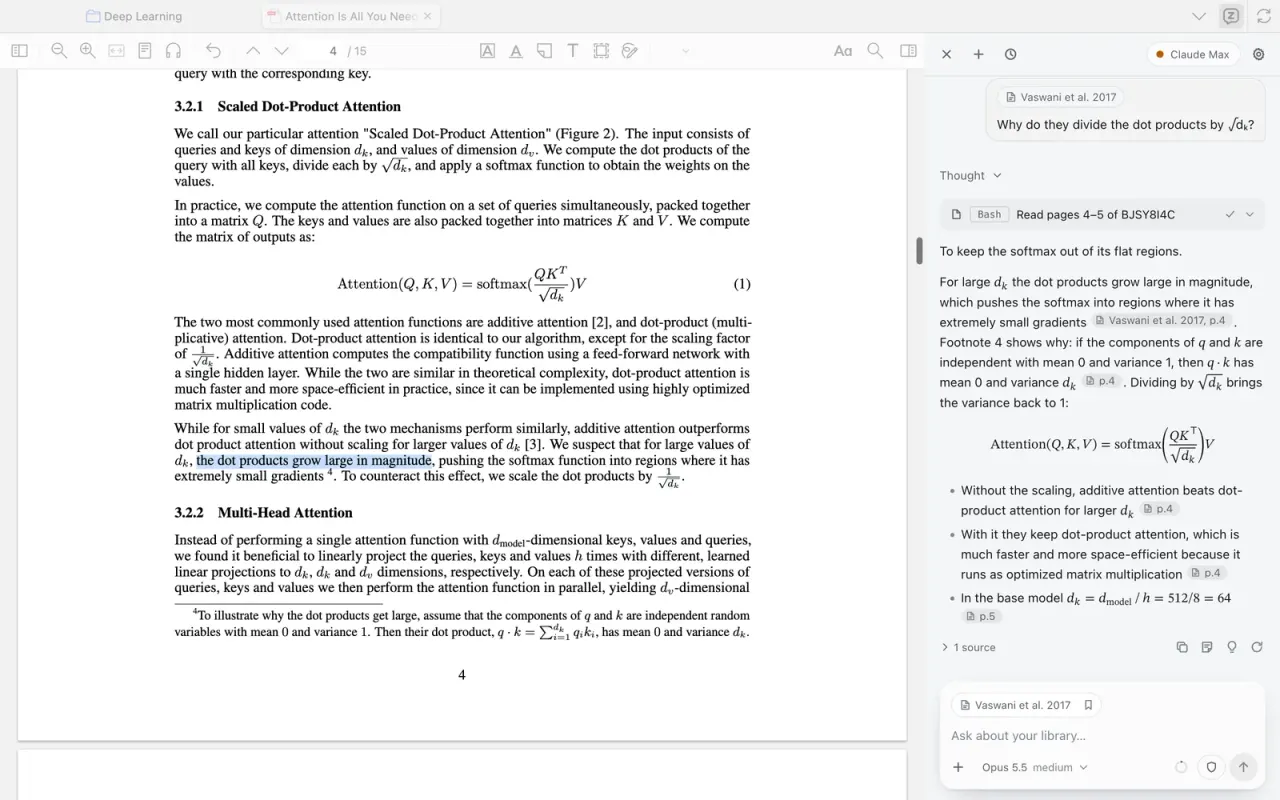
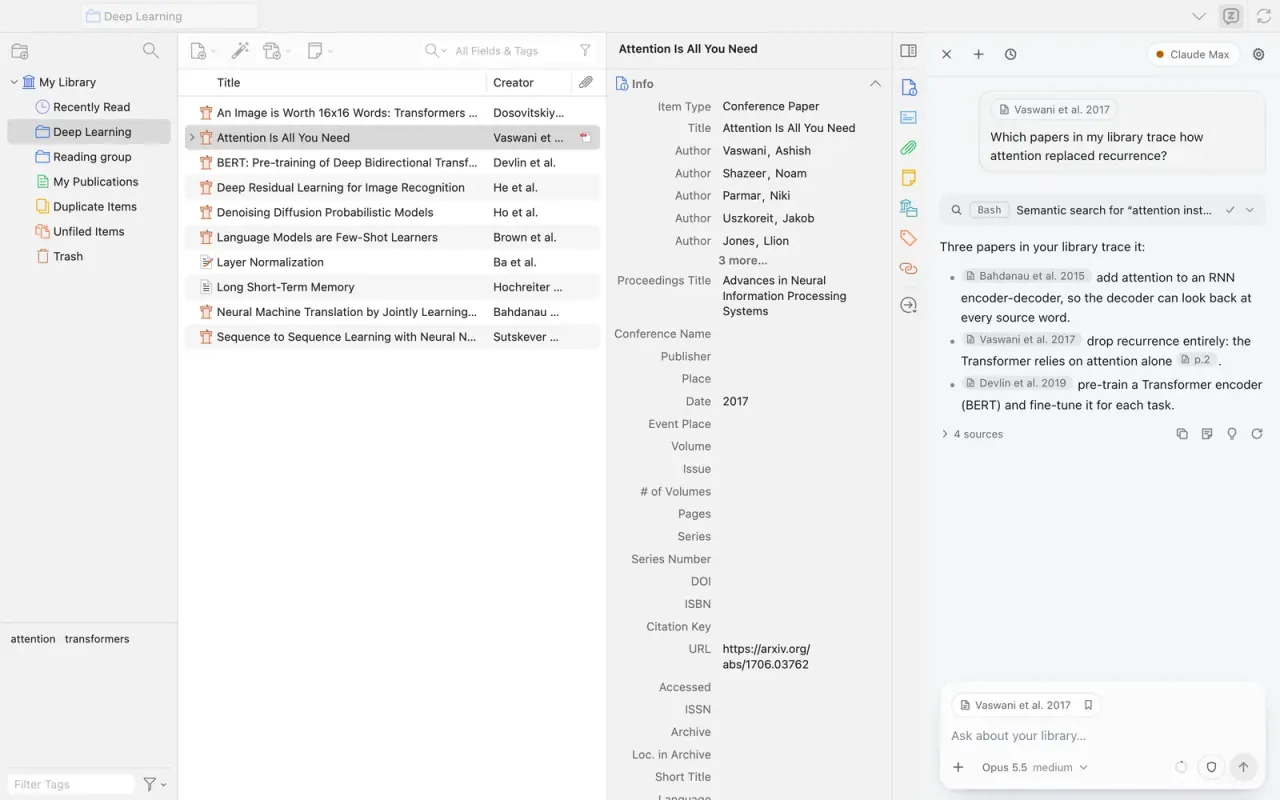
Ảnh từ README của tác giảAgent giải thích chi tiết bài báo kèm trích dẫn làm nổi bật văn bản trong PDF.
Ảnh từ README của tác giả 54yyyu ·Nguồn
Bạn có thể làm gì với nó
- Trò chuyện với các bài báo nghiên cứu trong thư viện để nhận bản tóm tắt hoặc giải thích
- Tìm kiếm tài liệu tham khảo dựa trên ý nghĩa nội dung thay vì chỉ từ khóa
- Tự động tổ chức và chú thích các mục trong thư viện bằng Claude hoặc Cursor
Kiểm tra an toàn
Không thấy dấu hiệu rủi ro trong các file đã quét.
Quét tự động các file trong repo. Luôn xem lại code trước khi chạy.
Trích từ README
Zotero MCP: Chat with your Research Library in Claude, ChatGPT, and more
Your Zotero library, in every AI agent. Search, read, cite and annotate your papers from Claude, ChatGPT, Codex, Cursor, or a chat panel inside Zotero.
Install · Docs · Zotero Agent · Discord
Zotero Agent explaining a paper with page citations. A click on a citation opens the page and flashes the cited sentence.
Zotero MCP connects your Zotero research library with ChatGPT, Claude, and other AI assistants (e.g., Cherry Studio, Chorus, Cursor) via the Model Context Protocol. Search your library, read and annotate papers, add and organize items, and find research by meaning.
AI agents: read docs/for-agents.md first. It covers which route to use, setup, and the commands in one place.
Three ways in
One package, zotero-mcp-server, ships all three. Pick the one that fits where you work.
| MCP server | zotero-cli + agent skill | Zotero Agent | |
|---|---|---|---|
| For | Chat apps that speak MCP but have no shell: Claude Desktop, ChatGPT, Cherry Studio, Chorus | Agents with a shell: Claude Code, Codex, Cursor, Windsurf, Gemini CLI, Amp, OpenCode | Chatting inside Zotero, next to the PDF you are reading |
| How | zotero-mcp setup | zotero-mcp install-skill | zotero-cli plugin, then install the .xpi in Zotero |
| Why | Works in any MCP client | 98 tokens in context until it is needed, instead of ~13k | Knows the item, page and selection you have open; answers link to pages |
| Guide | Getting started | CLI and agent skill | Zotero Agent plugin |
What it does
- Search by title, author, tag, collection, full text, or meaning (semantic search with local, OpenAI, Gemini, or Ollama embeddings)
- Read metadata, BibTeX, full text, and page ranges of PDFs, with page images where text extraction garbles math, figures, and tables
- Annotate: highlights and area boxes placed on the exact words, figure, table, or equation; notes; PDF annotation extraction
- Write: add papers by DOI, URL, ISBN, BibTeX, or file (with open-access PDFs), manage collections and tags, merge duplicates
- Local or web: in local mode reads come straight from
zotero.sqlite; writes go to the running Zotero 10+ or through the web API - Scite citation tallies and retraction alerts (optional)
Quick start
1. Install (Python 3.10+):
uv tool install zotero-mcp-server # or: pip install zotero-mcp-server
New to the command line? Try the community-built Zotero MCP Setup: a macOS GUI installer, one-click scripts for Mac and Windows, and a step-by-step guide.
2. Enable Zotero's local API: in Zotero 7+, open Settings → Advanced and tick Allow other applications on this computer to communicate with Zotero.
3. Connect your assistant:
Claude Desktop
zotero-mcp setup # auto-configures Claude Desktop
or add the server by hand to claude_desktop_config.json:
{
  "mcpServers": {
    "zotero": {
      "command": "zotero-mcp",
      "env": { "ZOTERO_LOCAL": "true" }
    }
  }
}
Claude Code, Codex, Cursor and other agents with a shell
Teach the agent to drive zotero-cli (the cheaper route, see below):
zotero-mcp install-skill
Or use the MCP server: for Claude Code, add the same mcpServers entry as above to ~/.claude.json.
ChatGPT, Cherry Studio, Chorus, Autohand and other clients
See Getting started.
Zotero itself (the Zotero Agent chat panel)
zotero-cli plugin # where the .xpi is, and how to install it
Then in Zotero: Tools > Plugins, the gear, Install Plugin From File. Details: Zotero Agent plugin.
4. Writes (optional): on Zotero 10+, run zotero-mcp authorize-local once and choose Always Allow. On older Zotero, add ZOTERO_API_KEY and ZOTERO_LIBRARY_ID to write through the web API.
Then ask things like "Find papers in my library on attention mechanisms", "Summarize the key findings of this paper", or "Highlight the main claims of this PDF".
Optional extras
The base install covers search, reading, annotations, and writes. Heavier features are extras:
| Extra | What it adds | Install command |
|---|---|---|
semantic | Semantic search via ChromaDB, sentence-transformers, OpenAI/Gemini embeddings | pip install "zotero-mcp-server[semantic]" |
pdf | PDF outlines, page layout and page images (PyMuPDF), EPUB annotations | pip install "zotero-mcp-server[pdf]" |
scite | Scite citation tallies and retraction alerts (no account needed) | pip install "zotero-mcp-server[scite]" |
all | Everything above | pip install "zotero-mcp-server[all]" |
Update any time with zotero-mcp update.
MCP server or agent skill?
If your agent has a shell (Claude Code, Cursor, Codex, Windsurf, Gemini CLI, Amp, OpenCode …), one command teaches it to drive zotero-cli:
zotero-mcp install-skill
An MCP server sends every tool's schema on every request, before you type anything. The skill costs 98 tokens until the agent decides it is r