claude-smart
ReflexioAI · ReflexioAI/claude-smart
A plugin that allows AI agents like Claude Code to learn from user corrections and turn them into durable project-specific or shared skills for future sessions.
Turns corrections into Preferences, Project-specific skills, and Shared skills for Claude Code, Codex, and OpenCode.
See it in action
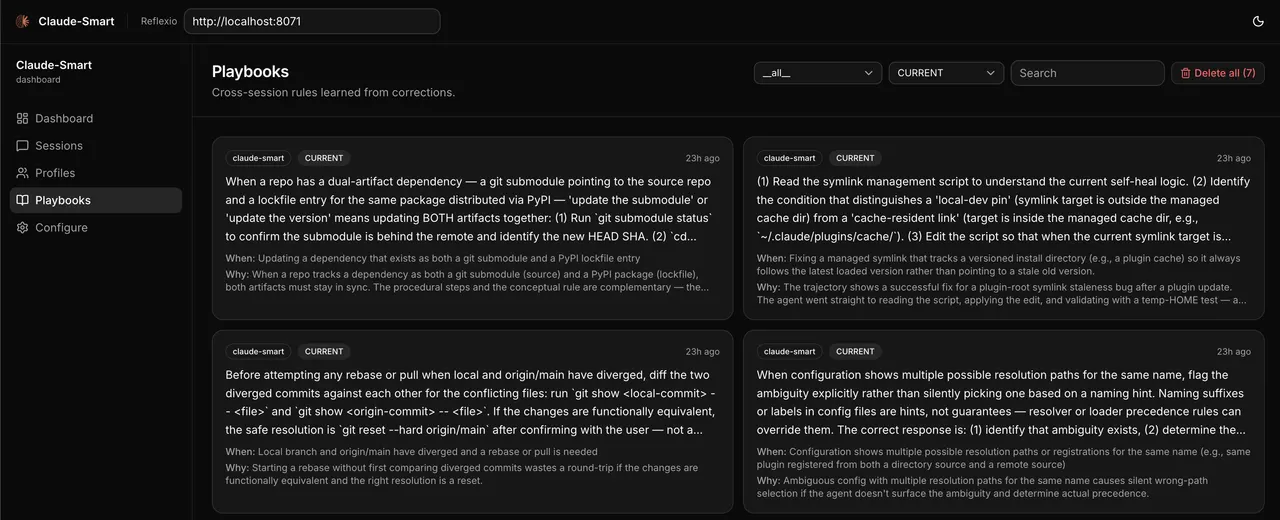
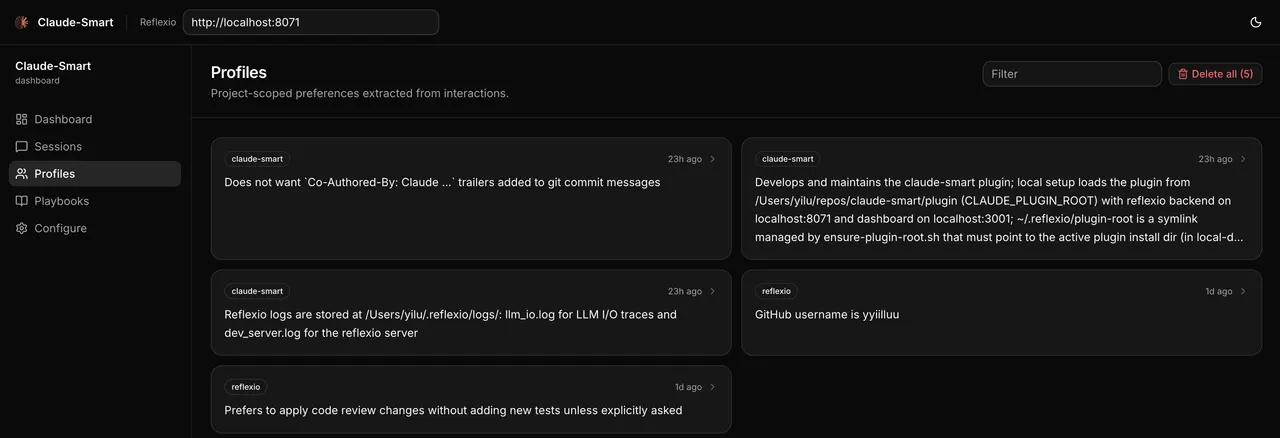
From the author's READMEPlaybooks dashboard displaying durable skills learned from past corrections
From the author's README ReflexioAI ·Source
What you can do with it
- Teach Claude Code preferred coding patterns that persist across projects.
- Prevent an AI agent from repeating past mistakes by learning from corrections.
- Establish project-specific coding rules that an AI agent will automatically follow.
Safety check
No risky patterns found in the files we scanned.
Automated scan of the repo files. Always review code you run.
From the README
claude-smart
A self-improvement plugin for Claude Code, Codex, and OpenCode that turns interactions into durable skills they follow in future sessions.
Quick Start • How It Works • Commands • Dashboard • Configuration • Troubleshooting • License
claude-smart learns from your corrections and from what's already working — so the assistant stops repeating mistakes and reuses proven paths. Project-specific skills capture repo-local rules, and shared skills roll up durable patterns for reuse across projects.
vs claude-mem: ~3× better at turning your corrections into rules Claude follows, ~50% more of your guidance is retained. Read the benchmark →
⭐ Built on the open-source reflexio engine — if claude-smart helps you, star reflexio on GitHub.
Quick Start
Requires Node.js 20+ (for npx) and the host CLI you're installing into (claude, codex, or opencode) on PATH.
Claude Code
npx claude-smart install
Then restart Claude Code.
Codex
npx claude-smart install --host codex
Then fully quit and reopen Codex so hooks reload.
OpenCode
npx claude-smart install --host opencode
Then restart OpenCode in your project so it loads the plugin from opencode.json. Add --global to install for all OpenCode projects on this machine instead.
Uninstall
npx claude-smart uninstall                    # Claude Code
npx claude-smart uninstall --host codex       # Codex
npx claude-smart uninstall --host opencode    # OpenCode
Restart the host afterward. Learned data under ~/.reflexio/ and ~/.claude-smart/ is preserved and shared across hosts, so you can uninstall or switch hosts without losing skills or preferences.
For per-host details — what the installers and uninstallers touch, OpenCode config resolution and model/env overrides, and Windows notes — see Host install notes in DEVELOPER.md. Developing the plugin itself? See Developing locally.
Not supported: Claude Code Cowork, claude.ai/code web, or remote Codex environments without local plugin hooks — they run outside your local machine, so the local backend/dashboard and
~/.reflexio/aren't reachable.
Why Learning, Not Memory
Most memory tools just record. Claude remembers what happened, but doesn't change what it does next.
claude-smart focuses on learning instead.
Four things this changes:
-
💡 Stop repeating the same mistakes: Produces actionable skills Claude can follow next time; memory only records what happened.
Example: a deploy fails after Claude bumps
prismafrom 5.x to 6.0; you tell it to roll back because 6.0 breaks nested writes in your order flow. Memory: “deploy broke after prisma bump; user rolled back” Learning: “treat major-version bumps of ORMs/DB drivers as breaking — verify with integration tests, not just unit tests” -
🚀 Start from the optimized path: Records and optimizes the steps that worked so Claude can reuse them, instead of re-exploring each session.
Example: Claude spends several iterations trying to start the local dev environment before discovering that this repo requires
pnpm dev:allinstead of the usualnpm run dev. Memory: “user mentioned thatnpm run devdid not work” Learning: “for this repo, always usepnpm dev:allto start the full local stack —npm run devonly starts the frontend and causes missing service errors”Instead of re-exploring, Claude Code starts from the proven path—reducing planning steps, latency, and token usage.
-
🌐 Project-specific and shared skills: Session memory disappears with the conversation. Project-specific skills preserve repo-local rules, while shared skills roll up patterns that should transfer across projects. Preferences stay scoped to the current project so per-repo preferences don't leak across projects.
-
🪶 Better context without prompt bloat: Distilled, deduplicated skills stay in dozens of tokens—not thousands—even as the project grows.
Demo
https://github.com/user-attachments/assets/ed84d73a-d5b7-4a0d-ab2c-f2c060c3f276
Key Features
- 🧠 Learn, don't just remember — Corrections become structured, deduplicated rules, not transcript replays.
- ⚡ Fully automatic learning — Every user turn, tool call, and assistant response is captured via lifecycle hooks and extracted into rules without you running anything.
- 📈 Continuously self-tuning, not just append-on-conflict — Existing rules are continuously refined, not just appended to. Wording gets clearer, when-to-apply triggers tighten or broaden as evidence accumulates, near-duplicates merge, stale rules are superseded, and dead ones are archived. The library gets sharper, not just bigger.
e.g. correct the same
npm test --rungotcha twice → consolidated into one rule. New evidence shows it applies tovitesttoo → scope broadened. Switch policy topnpm test→ old rule archived, new one supersedes it. - 🔌 No external API call — semantic search runs on an in-process ONNX embedder (all-MiniLM-L6-v2), and all data (preferences, skills, interaction buffers) is stored locally on your machine (
~/.reflexio/and~/.claude-smart/). - 🔎 Hybrid search — Skills and preferences are indexed with vector + BM25 search for fast, robust retrieval.
- 🧪 Offline resilience — If the reflexio backend is down, hooks buffer to disk; the next successful publish drains them.
- 🧰 Manual correction marker —
/claude-smart:learnin Claude Code, orbash ~/.reflexio/plugin-root/scripts/cli.sh learnin Codex, flags the last turn as a correction so the extractor weights it heavily.
Dashboard
A web UI for browsing session histories, inspecting preferences, and editing project-s