SenseNova-Skills
OpenSenseNova · OpenSenseNova/SenseNova-Skills
A collection of modular SenseNova skills for AI agents, extending models with end-to-end office capabilities like image generation, slide-deck creation, and Excel data analysis.
Modular SenseNova skills for building AI-powered office assistants and productivity workflows
See it in action
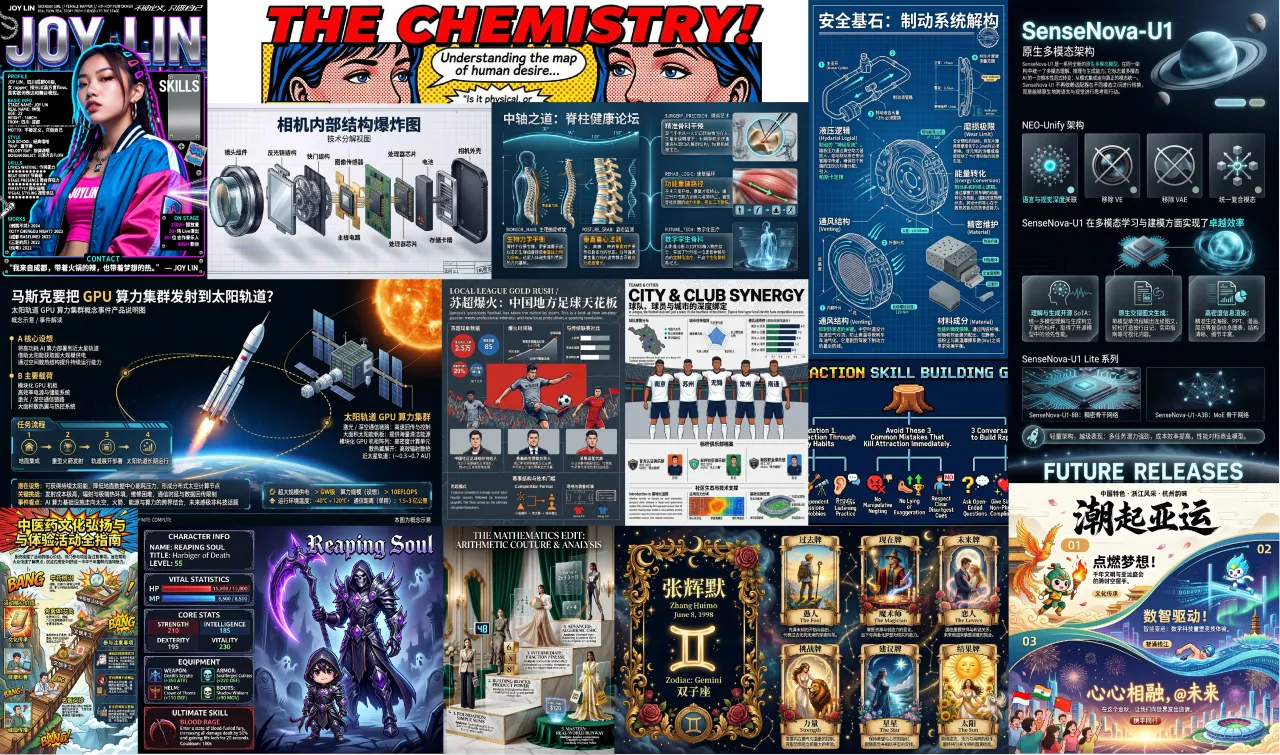
From the author's READMEA collection of infographics and posters generated by SenseNova skills
From the author's README OpenSenseNova ·Source
What you can do with it
- Generate presentation slides automatically from research data.
- Perform complex Excel data analysis using an AI agent.
- Create an AI-powered office assistant for document processing and team collaboration.
Safety check
No risky patterns found in the files we scanned.
Automated scan of the repo files. Always review code you run.
From the README
SenseNova-Skills
English | 简体中文
The SenseNova model family plugs directly into agent runtimes such as OpenClaw and hermes-agent, with the skills in this repository extending the models with concrete, end-to-end office capabilities.
In this repository each skill lives in its own directory and declares triggers, capabilities, and execution flow through a SKILL.md file, following the Agent Skills convention.
The skills cover image generation & visualization, slide-deck (PPT) generation, Excel data analysis, deep research, HTML experiences, team collaboration, and proactive project tracking — usable standalone or composed into end-to-end workflows.
🎨 Want to see what it can do? Check out our sn-infographic Gallery to explore nearly 100 stunning generation cases and steal their prompt designs !
🦝 Available out-of-the-box in Raccoon
The latest SenseNova models and the full Cowork-Skill suite in this repo are bundled into Raccoon, with enterprise-grade security and a zero-setup experience — if you'd rather not provision env, API keys, and runtimes yourself, you can use these capabilities directly through Raccoon. Free trial available — no payment required to get started.
Raccoon now ships a full upgrade across product capability and client experience:
- Three core office capabilities, strengthened: powered by SenseNova 6.7 Flash + Cowork-Skill, data analysis, PPT generation, and task planning each take a step up — covering the full loop from multi-file cleaning/analysis to formal report decks, industry/competitive research, and investment memos.
- New: infographic generation: built on the SenseNova U1 model, compresses complex data, long reports, and business insights into dense, structured, visual infographics that are easier to digest and share.
- New client + local Agent OS: the cloud model handles heavy reasoning and multimodal understanding; the local Agent OS sits next to your files, work context, and personal habits — delivering a more personalized, local, and secure AI-native office experience.
- Proven at scale: chosen by 15M+ individual users and thousands of enterprise customers.
👉 Try it: xiaohuanxiong.com
How to Use
These skills are designed to run inside an Agent Skills-compatible agent.
- Recommended runtime: pair them with OpenClaw or hermes-agent.
- Recommended LLM: pair them with the SenseNova Platform API.
International: platform.sensenova.ai/docs, Base URL
https://token.sensenova.ai/v1Mainland China: platform.sensenova.cn/token-plan, Base URLhttps://token.sensenova.cn/v1 - Install & configure: follow the full walkthrough in
INSTALL.md.
This repo documents both the international and mainland China SenseNova API flows. Make sure the docs page, API key, base URL, and model name all come from the same region.
Recommended: let the agent install the skills for you. Hand it the repo URL and ask it to clone and drop the skills into the right directory — for example:
"Please install SenseNova-Skills from https://github.com/OpenSenseNova/SenseNova-Skills into your skills directory."
After it finishes, you may need to manually restart the agent service before the new skills are picked up.
| Agent | Target directory |
|---|---|
| OpenClaw | ~/.openclaw/skills/ |
| hermes-agent | ~/.hermes/skills/ |
Prefer to install manually?
Clone this repository, then copy the subdirectories under skills/ into the target directory yourself:
git clone https://github.com/OpenSenseNova/SenseNova-Skills.git --depth=1
mkdir -p ~/.openclaw/skills
cp -r SenseNova-Skills/skills/* ~/.openclaw/skills/
For Hermes, swap the target to ~/.hermes/skills/.
Per-category Python dependencies, API keys, and invocation examples are documented in the 📖 Full guide for each section.
Skills List
🎨 Image & Visualization
📖 Full guide: docs/sn-image-generate_en.md (prerequisites, Quick Start, API config, and invocation samples).
| Name | Label | Description |
|---|---|---|
sn-image-doctor | Environment Doctor | Validates the SenseNova-Skills environment — checks sn-image-base install, Python deps, and required env vars; interactively fills missing values into .env. |
sn-image-base | Image Base Layer (Tier 0) | Low-level tools — text-to-image (sn-image-generate), image editing (sn-image-edit), image recognition (sn-image-recognize), and text optimization (sn-text-optimize) — exposed through a unified sn_agent_runner.py, designed to be called by upper-layer skills. |
sn-infographic | Infographic Generation (Tier 1) | Auto prompt-quality scoring, layout/style selection (87 layouts / 66 styles), multi-round generation with VLM review and quality ranking, producing publication- |