mobile-mcp
mobile-next · mobile-next/mobile-mcp
An MCP server that lets AI agents drive iOS and Android devices, emulators, and simulators for automation and testing.
Mobile MCP: let AI agents drive your iOS and Android apps. MCP server for simulators, emulators and real devices. Works with Claude Code, Codex, Cursor and any MCP client.
See it in action
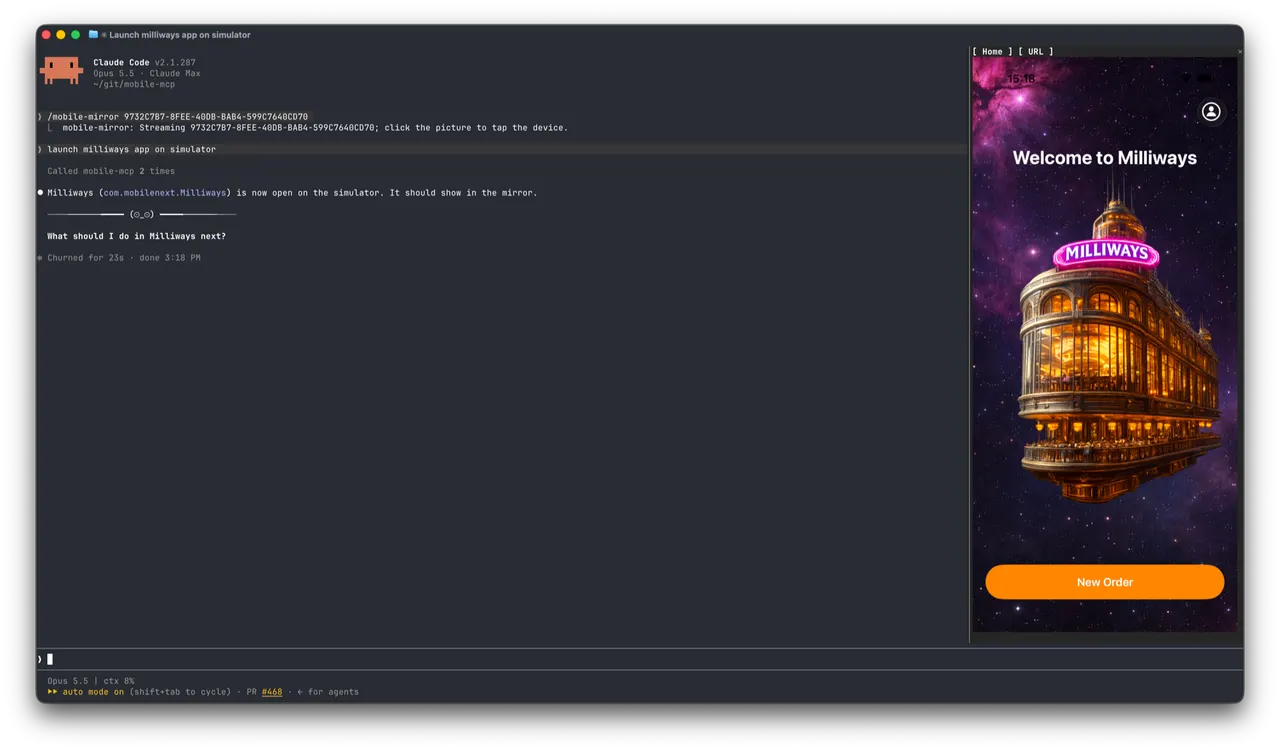
From the author's READMEClaude Code controlling an iOS simulator via Mobile MCP
From the author's README mobile-next ·Source
What you can do with it
- Automate UI testing for native mobile apps using Claude Code
- Perform automated data entry across multiple mobile applications
- Control real mobile devices in the cloud via agent tools
Safety check
No risky patterns found in the files we scanned.
Automated scan of the repo files. Always review code you run.
From the README
Mobile Next - MCP server for Mobile Development and Automation | iOS, Android, Simulator, Emulator, and Real Devices
This is an MCP Server that enables scalable mobile automation, development through a platform-agnostic interface, eliminating the need for distinct iOS or Android knowledge. You can run it on emulators, simulators, and real devices (iOS and Android).
This server allows Agents and LLMs to interact with native iOS/Android applications and devices through structured accessibility snapshots or coordinate-based taps based on screenshots.
Works with Claude Code, Codex, Gemini, GitHub Copilot, Antigravity — or any MCP-compatible client.
Run it against devices on your own machine, or against real iOS and Android devices in the cloud with Mobile Next Cloud — same tools, no local setup.
https://github.com/user-attachments/assets/bb084777-beb3-4930-ae6f-8d3fe694ddde
🚀 Quick start
Quick install detects the MCP clients on this machine (Claude Code, Codex, Cursor, VS Code, Gemini CLI and more) and lets you pick which ones to configure:
npx @mobilenext/mobile-mcp@latest install
Add --yes to configure every detected client without asking.
Manual setup per client: Installation and configuration
Main use cases
How we help to scale mobile automation:
- 📲 Native app automation (iOS and Android) for testing or data-entry scenarios.
- 📝 Scripted flows and form interactions without manually controlling simulators/emulators or real devices (iPhone, Samsung, Google Pixel etc)
- 🧭 Automating multi-step user journeys driven by an LLM
- 👆 General-purpose mobile application interaction for agent-based frameworks
- 🤖 Enables agent-to-agent communication for mobile automation usecases, data extraction
Main Features
- 🚀 Accessibility-first — fast and cheap: drives apps from the native accessibility tree (no vision model, no image tokens), falling back to screenshots + coordinates only when needed.
- 📱 One API, every target: the same tools work across iOS and Android — simulators, emulators, and real devices.
- 🧠 No platform expertise required: no XCUITest, no Espresso, no per-platform glue — describe the goal and the agent does it.
- 🧰 Full device control: taps, swipes, and gestures; app install/launch/terminate; screen recording; hardware buttons; deep links; orientation.
- 📊 Structured, deterministic output: reads real UI elements and extracts structured data, cutting the ambiguity of screenshot-only approaches.
- 🪞 Device mirroring in Claude Code: for Claude Code running in Ghostty or kitty. Install the plugin and run
/mobile-mirrorto see the device's live screen in a side pane, then tap, type and press Home/Back without leaving the terminal.
🎯 Platform Support
| Target | Supported | Setup |
|---|---|---|
| iOS Simulator | ✅ | Xcode + a booted simulator (xcrun simctl) |
| iOS Real Device | ✅ | Device connected over USB and trusted |
| Android Emulator | ✅ | Android SDK + running emulator (adb) |
| Android Real Device | ✅ | adb + USB debugging enabled & authorized |
🔧 Available MCP Tools
Device Management
mobile_list_available_devices- List all available devices (simulators, emulators, and real devices)mobile_get_screen_size- Get the screen size of the mobile device in pixelsmobile_get_orientation- Get the current screen orientation of the devicemobile_set_orientation- Change the screen orientation (portrait/landscape)mobile_fold_device- Fold or unfold a foldable device (iPhone Duo simulators, foldable Android emulators)mobile_set_location- Override the GPS location reported by the device, or clear the overridemobile_clipboard- Read or replace the device clipboard
Remote Devices (Mobile Next Cloud)
mobile_login_to_cloud_provider- Authenticate this machine with the cloud device provider (browser-based device-code login)mobile_list_remote_devices- List device models available to reserve from the cloud fleetmobile_allocate_remote_device- Reserve a physical cloud device for exclusive usemobile_release_remote_device- Release a reserved cloud device back to the fleet
App Management
mobile_list_apps- List all installed apps on the devicemobile_get_foreground_app- Get the app currently in the foregroundmobile_launch_app- Launch an app using its package namemobile_terminate_app- Stop and terminate a running appmobile_install_app- Install an app from file (.apk, .ipa, .app, .zip)mobile_uninstall_app- Uninstall an app by its package name or bundle IDmobile_clear_app_data- Clear an app's data so it starts fresh (Android and iOS Simulator)
Screen Interaction
mobile_take_screenshot- Take a screenshot to understand what's on screenmobile_save_screenshot- Save a screenshot to a filemobile_list_elements_on_screen- List UI elements with their coordinates and propertiesmobile_click_on_screen_at_coordinates- Click at specific x,y coordinates or on an element by its refmobile_double_tap_on_screen- Double-tap at specific coordinates or on an element by its refmobile_long_press_on_screen_at_coordinates- Long press at specific coordinates or on an element by its refmobile_swipe_on_screen- Swipe in any direction (up, down, left, right)mobile_start_screen_recording- Start recording the device screen to a video filemobile_stop_screen_recording- Stop the active screen recording and save the video
Input & Navigation
- **