opentakeoff
Kentucky-ai · Kentucky-ai/opentakeoff
An MCP-native measurement engine for PDF building plans, allowing AI agents to perform construction takeoffs and material estimation.
Open-source (AGPL-3.0) PDF takeoff for construction & flooring — the first engine an AI agent drives natively over MCP, not bolted on. Rooms measured on the wall faces, symbol sweeps, materials + quantities with full provenance, built for preconstruction. Runs entirely in your browser.
See it in action

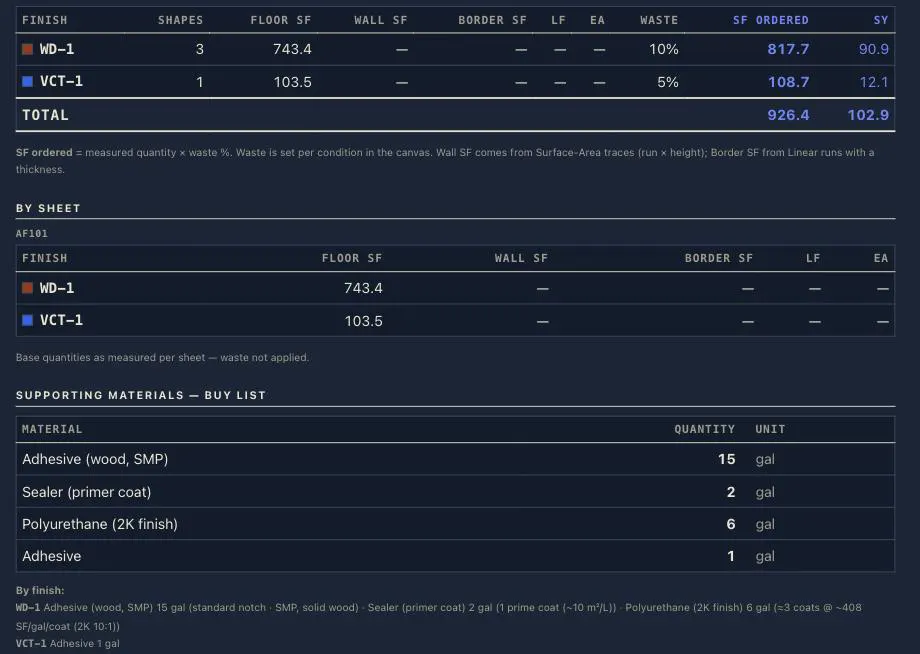
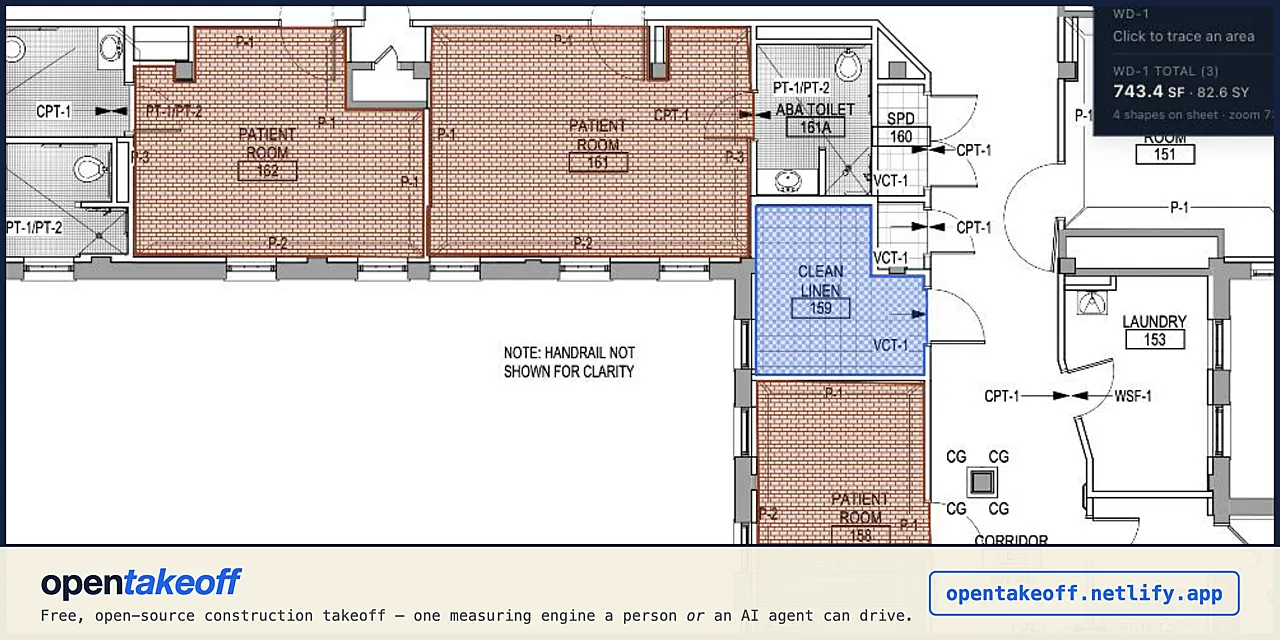
From the author's READMEInterface showing one-click area tracing on a patient room plan
From the author's README Kentucky-ai ·Source
What you can do with it
- Measuring room areas and perimeters from architectural PDFs via Claude
- Automating material quantity takeoffs for flooring or wall finishes
- Syncing manual canvas measurements with AI-generated estimates in real-time
Verified live · 53 tools
We started this MCP server in an isolated sandbox and it exposed these tools:
load_planOpen a plan PDF from disk. Default: replace the whole session (previous documents, scales, conditions, and shapes are cleared). merge: true ADDS the document to the working set instead (#152) — a bid
sheet_infoSheet detail: dims (px and pt), vector segment count, whether the sheet has vector linework (measure_polygon runs on it; get_sheet_vectors returns the strokes), scale status, the detected scale sugges
set_scaleSet a sheet's scale — exactly ONE of: label (a standard scale, e.g. '1/4" = 1'-0"'), upp (real feet per image px), calibrate (two points along a known dimension plus its real feet), or use_detected (a
propose_takeoffOpen a PROPOSAL — a named batch of the shapes you are about to commit, with one identity (#365). Every shape you commit from here on (measure_polygon, measure_line, measure_surface, place_count, the s
measure_polygonMeasure a closed polygon you supply (min 3 vertices, image px): area_sf and perimeter_lf at the sheet's scale. Requires the scale to be set. Pass condition to commit it; role "deduct" subtracts. A roo
cut_outCut a REAL hole in a committed floor_area shape (#206) — the way the canvas cuts one (#137): the same lib/cutout.js boolean subtract, so the two surfaces can never disagree about what a hole holds. Th
measure_lineMeasure an open polyline (min 2 points, image px): length_lf at the sheet's scale. Requires the scale to be set. Pass condition to commit it as a linear shape (base, transitions, feature strips, condu
measure_surfaceSurface Area — wall SF (#146): trace an OPEN run along the wall in plan view (min 2 points, image px) and the quantity is traced LF × height. This is how wall tile, wainscot, and wall systems are take
place_countCount markers — EA (#146): one point, one each. Thresholds, stair nosings, floor boxes, entrance mats — the scale-free quantity family. Commits one count shape per point (computed {count: 1}, exactly
symbol_sweepFind EVERY instance of a repeated plan symbol from ONE example — drains, thresholds, fixtures, transition markers: marquee a tight seed_rect around a single instance and the vector linework is searche
sweep_schedule_rowTake off a schedule row's mark from the row itself — the estimator's own gesture: a transition type sometimes exists only as a schedule row plus tag markers scattered across the plan sheets, and this
count_marksThe COUNT TAKEOFF in one deterministic call — no seeds, no model, seconds: census every VALUE-ANNOTATED mark tag on the plan-role sheets, counted per schedule mark, committed as EA markers when asked.
derive_baseMint the wall base from committed rooms (#148) — the estimator's most mechanical derivation: base LF = room perimeter − stated door openings. For every floor_area shape of source_condition, commits ON
derive_transitionsMint the transition where two finishes MEET (#202) — the derivation that follows derive_base, and the line an estimator draws by hand on every job. Pass the two finish tags and the tag the transition
takeoff_summaryPer-condition totals (floor/wall/border SF, LF, EA, SY, with and without waste) plus grand totals — the Report's numbers, computed by the same rules. Numbers only: the deliverable that SHOWS the work
npx -y opentakeoff-mcp · 22/10/2026
Safety check
No risky patterns found in the files we scanned.
Automated scan of the repo files. Always review code you run.
From the README
OpenTakeoff
The measurement engine for building plans—built so an AI agent can drive it, and so an estimator wants to.
A takeoff is the act of measuring quantities off a construction drawing. OpenTakeoff does it two ways over one engine: 53 MCP tools for an agent, and a browser canvas for a person. Agents and people share the takeoff document and quantity calculations. Each sheet carries its calibration; measurements carry geometry, method and authorship. Recalibration updates quantities together, incompatible imports report scale conflicts, and agent measurements carry an explicit review status. See the Phase 1 test guide.
For agents · Try the canvas · The engine's contract · For the person at the canvas · The data layer · Research · Fork it · Contribute
The two manuals: agent manual · user manual
Protocol work: Takeoff Protocol draft and compatibility status—formalizing existing records; current takeoff behavior is unchanged.
Read this in: 日本語 · 한국어 · 简体中文
Watch it: an autonomous agent runs a takeoff, live, no cuts (2:47) · hospital finish plan → report in about a minute (1:14) · canvas walkthrough (1:10) · One-Click Area (0:51)
One-Click Area is temporarily gated. The flood engine is being re-validated against a wider plan corpus. Until that finishes the One-Click tool is off the canvas rail (
Oreports the gate) and theone_click/detect_roomsMCP verbs are not registered (a default build ships 53 tools). Trace rooms with Area (A) in the canvas andmeasure_polygonover MCP; every other tool, sweep and derivation is unchanged. A build lifts the gate withVITE_ONE_CLICK=1(canvas) /OPENTAKEOFF_ONE_CLICK=1(server). Sections and videos below that show One-Click describe the engine as it returns — seedocs/design/ONE_CLICK_GATE.md.
The Premium workspace offers compact controls, searchable actions and sheets, personal panel arrangements, adjustable surfaces and larger sheet previews. It is the default when this browser has no saved layout choice; Classic layout remains available. See the workspace design and research.
Sheet navigation releases closed PDFs and embedded fonts from the tile workers; see the 30-flip rendering check. Beyond the PDFs in open tabs, at most four idle PDFs stay loaded (two on a phone or tablet, or a browser that reports 4 GB of memory or less), least recently used out first; see the 12-PDF check.
Start here
| You are | Go here |
|---|---|
| An estimator with a bid due | Open the canvas—drag in a plan, no account, nothing uploads. The user manual gets you from a blank tab to an exported takeoff in five minutes, and its working order is the sequence to run on a real bid set. |
| An AI agent—or the person wiring one up | npx -y opentakeoff-mcp, then the agent manual: the operating model, the standard finish every takeoff ends with, what the engine refuses to guess, and why. Tool-by-tool reference is mcp/README.md. |
| A developer building on the engine | AGENTS.md is the repo map and the ship discipline; FEATURES.md maps every capability to the code that does it. |
| A crew that wants its own copy | Fork it—your own instance on your own URL in a few minutes, AGPL-3.0, nothing phones home. Same path if you're going to send a pull request. |
Windows, macOS, Linux — all of it
OpenTakeoff is a client-only browser app, so the canvas runs the same on Windows, macOS, ChromeOS and Linux in any current Chrome, Edge, Firefox or Safari. Nothing installs, nothing uploads, and no feature is gated on an operating system.
- Shortcuts are platform-aware. The app labels modifiers for the keyboard in front of you —
Ctrl/Alt/Shifton Windows and Linux,⌘/⌥/⇧on a Mac — and the handlers have always treated⌘andCtrlas the same key. Press?in the canvas for the current list. - The MCP server is tested on Windows.
npx -y opentakeoff-mcpruns on Windows, macOS and Linux, and CI runs the full MCP suite — typecheck, tests, build and the packaged smoke test — onwindows-latestas well asubuntu-lateston every change. - Optional extras. The bundled capture server is stdlib Python 3 and runs anywhere
Python does — on Windows invoke it with
python capture\capture_server.py selftest(or thepylauncher) rather thanpython3. Neither it nor the optionalserver/AI sandbox is needed to use the canvas. - Locked-down enterprise fleets (MSIX packaging, Windows Sandbox, Intune silent deploy) are tracked in #226 and not yet built.
What this is
Measuring quantities off a plan is the input to every construction bid—how much floor, how much wall, how many fixtures, at what scale, on which sheet. It happens thousands of times a day. Until OpenTakeoff there was no open-source takeoff engine at all, web-based or otherwise, and nothing an autonomous agent could call.
OpenTakeoff is that engine, with two front ends sharing geometry and quantity modules:
- Review cleanup—agent