ai-nexus
JSK9999 · JSK9999/ai-nexus
ai-nexus is an AI coding assistant rule manager that filters and loads only relevant rules per prompt for Claude Code, Cursor, and Codex, reducing token usage.
AI coding assistant rule manager for Claude Code, Cursor, and Codex. Load only the rules you need.
See it in action
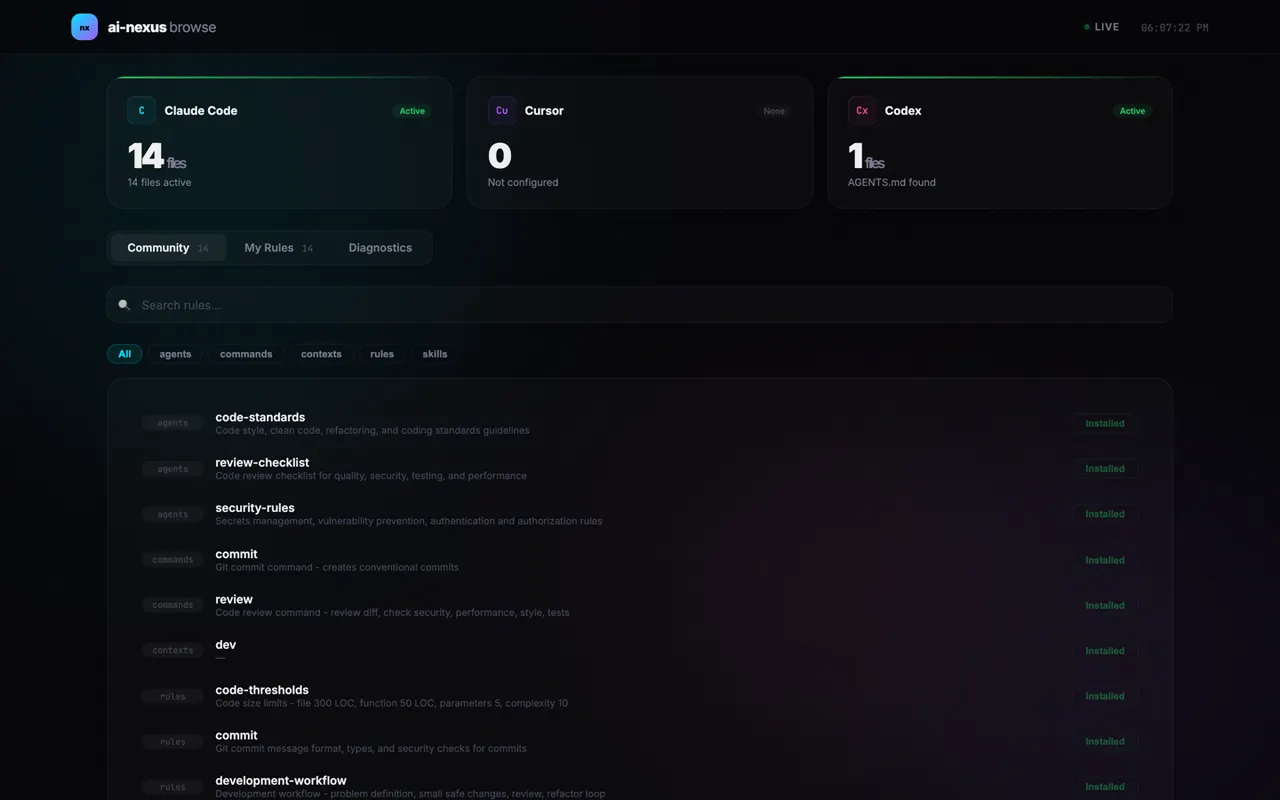


From the author's READMEWeb dashboard for managing rules across AI development tools
From the author's README JSK9999 ·Source
What you can do with it
- Optimize Claude Code sessions by loading only necessary rules to save tokens.
- Manage and use the same set of coding rules across Claude Code, Cursor, and Codex.
- Improve AI agent performance by preventing context window bloat from too many rules.
Safety check
No risky patterns found in the files we scanned.
Automated scan of the repo files. Always review code you run.
From the README
한국어 | English
ai-nexus
Only 2-3 relevant rules and skills load per prompt. The rest are hidden from Claude completely. Your rules and skills also work in Cursor and Codex — no extra setup.
Homepage | Documentation | Roadmap
npx ai-nexus install
The Problem
Rules with alwaysApply: true load on every prompt — the more you have, the more tokens you waste. With alwaysApply: false, Claude reads every rule's description to decide what to load — all your rule descriptions sit in Claude's context while it picks 2-3. You're paying Claude to filter rules instead of writing code. Skills and commands only load when invoked, but that means you have to remember what to call and when.
So most people only install a handful of rules. The more you have, the harder it is to know what's there — useful rules end up never loading or never getting installed in the first place.
A recent study from ETH Zurich (12 repos, 5,694 PRs) confirms this: loading all rules at once hurts performance by ~3% and increases cost by 20%+. The takeaway: only relevant context should be loaded per prompt.
On top of that, every AI tool has its own format — .claude/rules/*.md, .cursor/rules/*.mdc, .codex/AGENTS.md. If you use more than one tool, you end up maintaining the same rules and skills in multiple places, and they inevitably drift apart.
The Solution
ai-nexus filters rules before Claude sees them. A semantic router hook runs on each prompt, picks 2-3 relevant files, and physically parks the rest in rules-inactive/. Claude only sees what it needs — it doesn't even know the rest exist. Filtering is done by keyword matching (free) or GPT-4o-mini (~$0.50/month), not by Claude.
Nothing is deleted — just parked in rules-inactive/ and reactivated when the next prompt needs it. Write once, deploy across all your tools:
Write once:
  config/rules/commit.md
  config/skills/react.md

Deploy everywhere:
  ✓ Claude Code  → .claude/rules/ (with semantic routing)
  ✓ Cursor       → .cursor/rules/*.mdc (auto-converted)
  ✓ Codex        → .codex/AGENTS.md (aggregated)

One source of truth. Every tool in sync.
Only 2-3 relevant rules and skills loaded per prompt.
Why ai-nexus?
| Benefit | Detail | |
|---|---|---|
| Filter before Claude, not inside Claude | However many installed, only 2-3 loaded per prompt | Native alwaysApply: false has Claude read all descriptions to decide. ai-nexus filters before Claude starts — Claude never sees irrelevant files. Filtering costs $0 (keywords) or ~$0.50/mo (GPT-4o-mini). |
| Write once, deploy everywhere | One file → three tools | Write a single .md file. ai-nexus auto-converts to .mdc for Cursor and AGENTS.md for Codex. No more copy-pasting. |
| AI-powered selection | GPT-4o-mini or Claude Haiku picks files for you | A hook runs on every prompt, loading only what you need. Costs ~$0.50/month. Falls back to keyword matching with zero cost. |
| Team-wide consistency | Git-based sharing | Everyone installs from the same repo. npx ai-nexus update keeps the whole team in sync. |
| Your edits are safe | Non-destructive updates | Install and update never overwrite your local customizations. Only new files are added. |
| Community marketplace | Browse, install, remove — from your browser | npx ai-nexus browse opens a local web UI. 230+ community rules and skills available instantly after PR merge. |
Quick Start
# Interactive setup wizard (default)
npx ai-nexus install

# Quick install with defaults
npx ai-nexus install -q

# Use your team's rules
npx ai-nexus install --rules github.com/your-org/team-rules
Demo
Setup Wizard
Installed Rules
Supported Tools
| Tool | How it works | Token overhead |
|---|---|---|
| Claude Code | Semantic Router dynamically loads relevant rules and skills per prompt | Only 2-3 files loaded |
| Cursor | Converts to .mdc format; Cursor's built-in search handles filtering | Depends on Cursor's search |
| Codex | Aggregated AGENTS.md (all files merged into single file) | All files loaded |
How It Works
Claude Code: Semantic Router
Unlike alwaysApply: false where Claude reads all descriptions inside its context, ai-nexus runs a hook before Claude starts. It moves relevant files into rules/ and parks the rest in rules-inactive/. Claude never sees the irrelevant ones:
~/.claude/
├── hooks/
│   └── semantic-router.cjs   # Runs on each prompt
├── settings.json             # Hook configuration
├── rules/                    # Active rules
└── rules-inactive/           # Parked rules (not loaded)
With AI routing (optional):
export OPENAI_API_KEY=sk-xxx        # or ANTHROPIC_API_KEY
export SEMANTIC_ROUTER_ENABLED=true
GPT-4o-mini or Claude Haiku analyzes your prompt and picks the right rules and skills. Cost: ~$0.50/month. Requires explicit opt-in.
Full setup guide: Semantic Router Setup — provider selection, environment variables, custom models, and verification.
Without AI (default): Keyword matching activates rules and skills based on words in your prompt. Zero cost, no API key needed.
Cursor: Rule Converter
ai-nexus converts .md rules to Cursor's .mdc format, adding description and alwaysApply metadata automatically:
---
description: Git commit message conventions and best practices
alwaysApply: false
---

# Commit Rules
...
After conversion, Cursor's built-in semantic search handles rule filtering — ai-nexus does not run a router for Cursor. The value is unified rule management: write rules once, use them across Claude Code, Cursor, and Codex.