diagram-design
cathrynlavery · cathrynlavery/diagram-design
Enables your agent to generate editorial-quality diagrams in various types using self-contained HTML+SVG, without generic or messy outputs.
Editorial diagram design for Claude Code, Codex, GitHub Copilot, Cursor, Factory Droid, and Pi. 44 diagram types. Self-contained HTML + SVG. No shadows. No Mermaid slop.
See it in action
Run on Airsc
Task: “Draw how the Airsc Previewer turns README images into resource previews, in the Airsc brand colours.”
Claude Code · Opus 5.5 · 2026-10-09
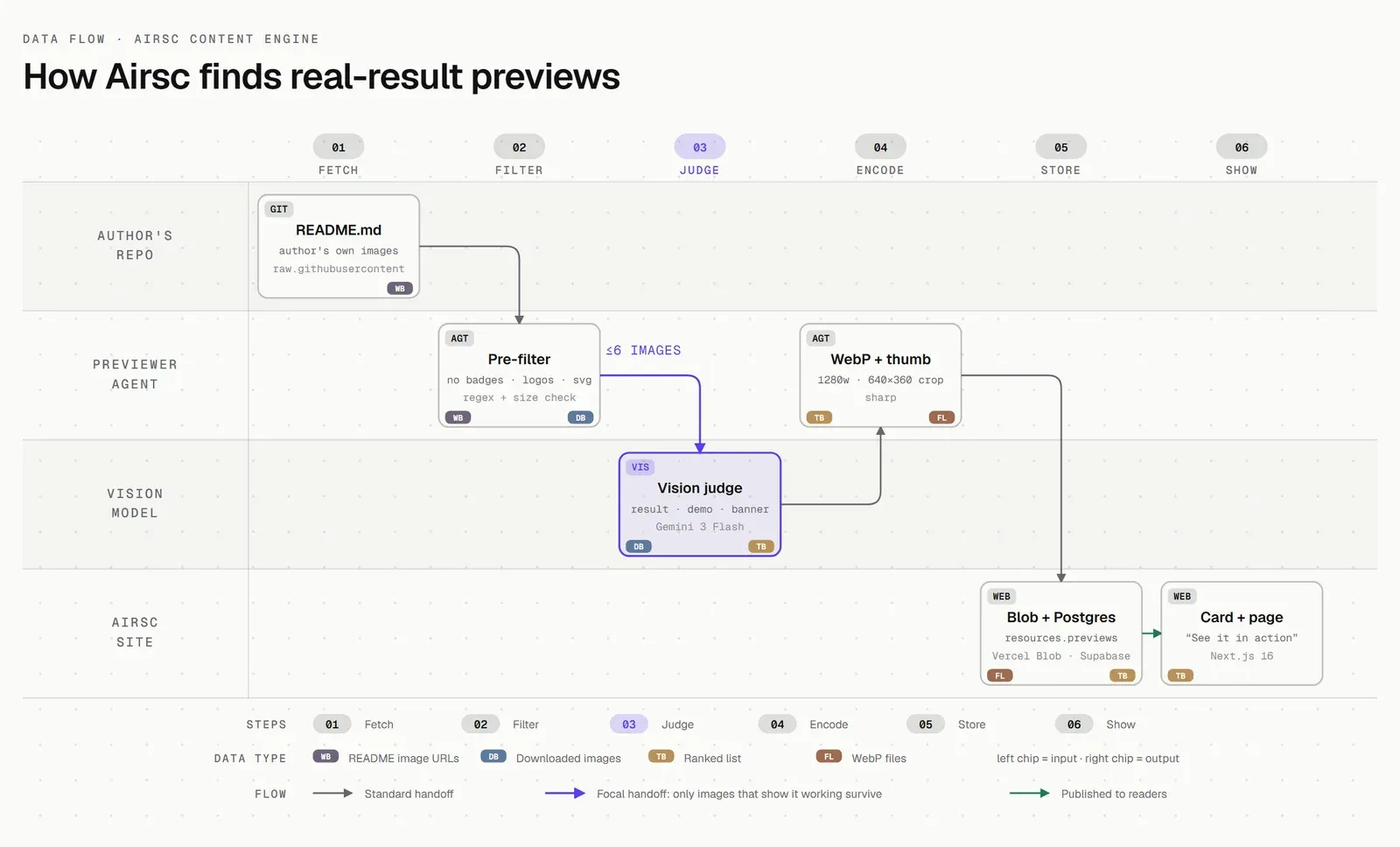
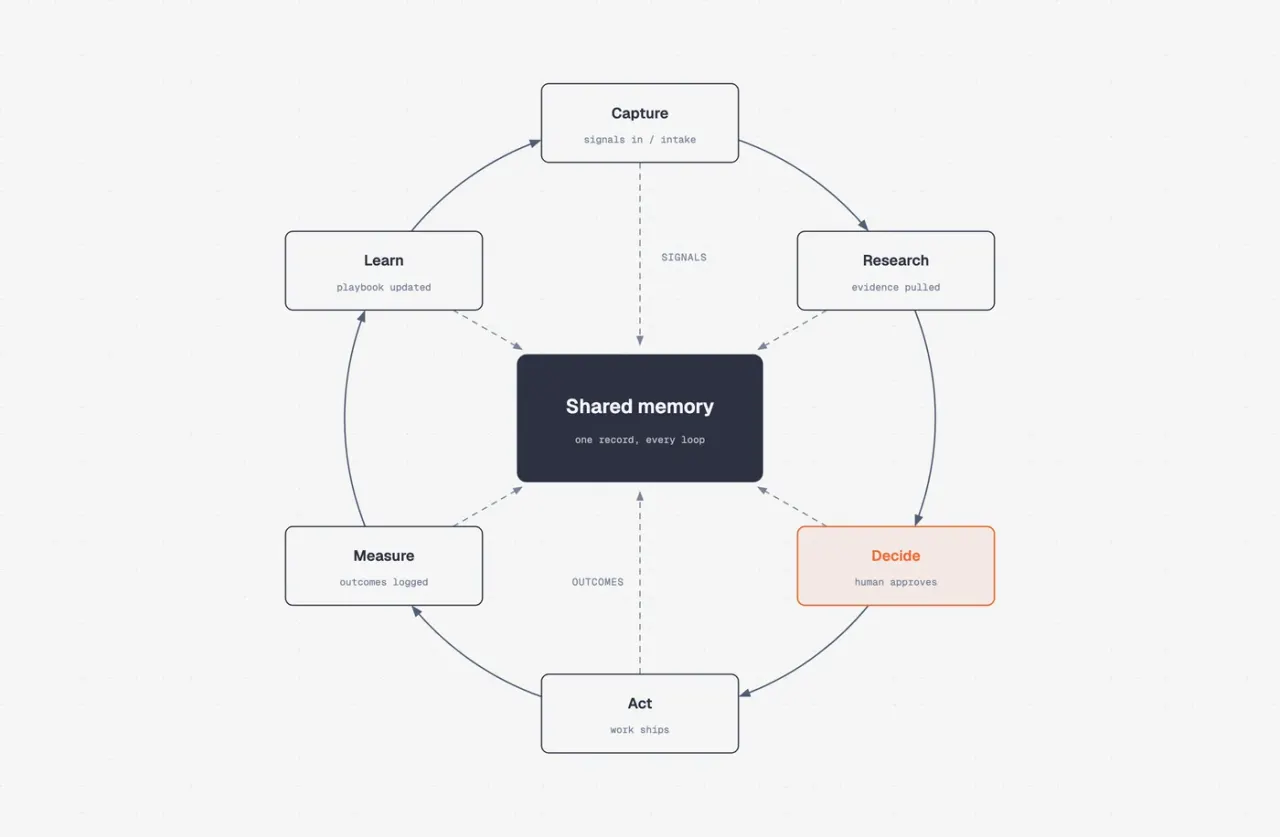
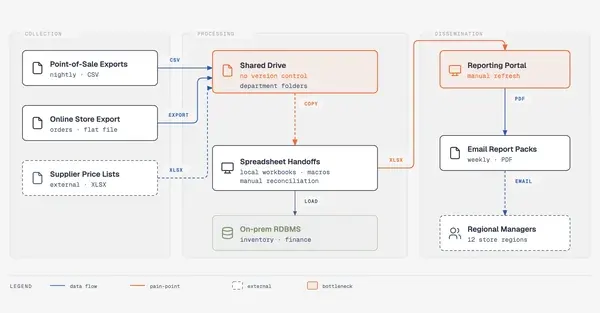
Run on AirscData flow: README → pre-filter → vision judge → WebP → Blob + Postgres → card. Passed the skill's own self-check and geometry check.
From the author's README cathrynlavery ·Source
What you can do with it
- Generate a professional architecture diagram from a system description.
- Create a user journey map or a Kanban board visualization.
- Redraw existing Mermaid or Draw.io diagrams with a consistent style.
Try asking your agent
- “Generate an architecture diagram for a microservices system with a database, API gateway, and frontend client. Emphasize data flow.”
- “Draw a Kanban board visualization for tasks: 'Backlog', 'In Progress', 'Review', 'Done'. List 3 items in each column.”
- “Redraw this Mermaid diagram into an editorial-style dependency graph: `graph TD; A-->B; B-->C; A-->C;`”
Safety check
No risky patterns found in the files we scanned.
Automated scan of the repo files. Always review code you run.
From the README
An agent skill that draws diagrams as one self-contained HTML + SVG file, in your brand.45 diagram types. No shadows. No Mermaid slop.
Install · What it makes · Quickstart · Match your brand · Import · Export · Contributing
npx skills add cathrynlavery/diagram-design
Ask your agent in plain words:
- "Make me an architecture diagram of my app: frontend, backend, database, Redis cache."
- "I need a quadrant showing Q2 projects by impact vs effort."
- "Give me a sequence of a bearer call with token refresh on 401."
- "Onboard diagram-design to https://yoursite.com" (pulls your palette and fonts so every diagram after this one matches your site)
The agent picks the type, states its plan, and writes one .html file you can open by double-clicking.
Install
Works with any host that reads Agent Skills, including Cursor, Claude Code, Codex, GitHub Copilot, Gemini CLI, Cline, Windsurf and Amp:
npx skills add cathrynlavery/diagram-design
In Claude Code, the plugin marketplace gets you updates and the slash commands:
/plugin marketplace add cathrynlavery/diagram-design
/plugin install diagram-design@diagram-design
Official builds come only from this repository. LittleMight, Cathryn Lavery's company, publishes the plugin directory listings; a listing under any other name is an unofficial copy. PRIVACY.md lists what the skill sends over the network.
Claude Code: turn on auto-update
After installing, run /plugin, open Marketplaces, select diagram-design, and choose Enable auto-update. Claude Code disables auto-update by default for third-party marketplaces; after this toggle, it refreshes the marketplace and installed plugin in the background after startup. Run /reload-plugins when prompted, or let the next session load the update.
Cursor, Cline, Gemini CLI, Windsurf, Amp, Zed, Warp, Roo, Kilo and other Agent Skills hosts
The cross-agent skills CLI resolves this repository, detects skills/diagram-design/SKILL.md, and installs the whole skill (references/, assets/, scripts/) into every host root you select, including Cursor's:
npx skills add cathrynlavery/diagram-design
When the selected roots resolve to more than one skills directory, the CLI asks for an installation method and recommends Symlink: one canonical copy, linked into each root, so a later update reaches all of them at once. Pass --copy for independent copies per host instead. A selection that resolves to a single directory is copied, because the distinction is immaterial there. Where symlinks are unavailable (Windows without Developer Mode) the CLI falls back to copies and reports which roots it copied.
This is a standalone install, separate from the marketplaces below: it does not follow marketplace updates automatically. Pull merged updates with npx skills update diagram-design. It also installs the Agent Skill only, so the /export-diagram, /import-mermaid, /profile, and /doctor command surfaces stay with the native packages. On a host that has one of the marketplaces below, prefer the marketplace.
One-time migration: an existing standalone
npx skills addcopy will not start following the Codex marketplace automatically. Remove that standalone copy, then use the Codex marketplace commands. Likewise, uninstall a personal Cowork copy and reinstall Diagram Design from your organization's marketplace. Future marketplace version bumps then flow through each client's native update path.
Codex
codex plugin marketplace add cathrynlavery/diagram-design
codex plugin add diagram-design@diagram-design
Codex refreshes configured Git marketplaces at startup. To fetch immediately, run codex plugin marketplace upgrade diagram-design and start a new session.
GitHub Copilot
copilot plugin marketplace add cathrynlavery/diagram-design
copilot plugin install diagram-design@diagram-design
Copilot installs the shared Diagram Design skill plus its doctor, export, import, and profile capabilities from the existing repository marketplace. Confirm discovery with copilot skill list (or /skills in an interactive session), then ask for a diagram in natural language. To fetch a merged update, run copilot plugin marketplace update diagram-design, then copilot plugin update diagram-design@diagram-design.
Factory Droid
droid plugin marketplace add https://github.com/cathrynlavery/diagram-design
droid plugin install diagram-design@diagram-design --scope user
Droid tracks Git plugins by commit rather than the manifest's display version. To fetch a merged update, run droid plugin marketplace update diagram-design, then droid plugin update diagram-design@diagram-design --scope user, and start a new session.
Claude Cowork (organization marketplace)
Organization GitHub marketplaces currently require a private or internal repository, so first mirror this public repository into one owned by your organization. In Organization settings → Plugins, choose Add plugin → GitHub, connect that mirror, and enable Sync automatically from the marketplace menu. Automatic sync runs when a pull request containing a plugin version bump is merged to the mirror's default branch; direct pushes do not trigger the webhook. Install Diagram Design from the resulting organization marketplace.
Pi
pi install https://github.com/cathrynlavery/diagram-design
Run /reload in an open Pi session. Pi makes the skill available for matching diagram requests; use /skill:diagram-design to invoke it