New AI agent resources this week (week 44, 2026)
Updated 26/10/2026
This digest is for vibe coders who want to see what is new without reading 16 listings. We added these resources to Airsc in the last 7 days. Each one has a safety label and a quality score.
This week leans toward making things: videos from HTML, UI designs from a prompt, diagrams, and websites. There are also a few tools that improve your daily coding setup. Three resources carry a caution label, so read the notes below before installing them.
- PluginSafe
hyperframes
heygen-com
Turn HTML and CSS into high-quality MP4 videos and animations directly through your AI coding agent.
71kApache-2.0#1 · Why we picked it
Safe, quality 98, beginner level, and lets your agent turn HTML and CSS into MP4 videos. - SkillSafe
huashu-design
alchaincyf
Generate production-ready UI designs, prototypes, and editable PPTX files directly from natural language prompts within your AI agent.
26kMIT#2 · Why we picked it
Safe, quality 95, and good for getting landing page designs, prototypes and editable PPTX files from a single prompt. - PluginSafe
SeeCode
Aryanutkarsh
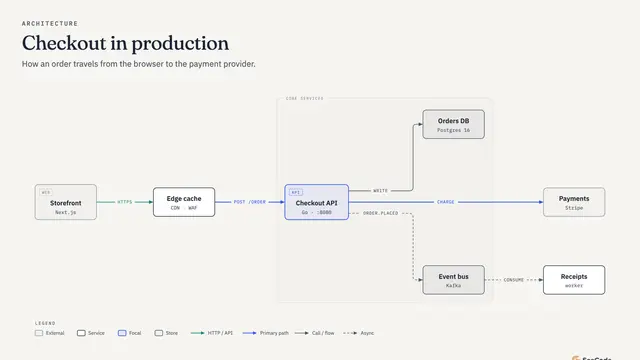
Generate interactive, animated architecture diagrams and charts from simple descriptions or data files.
677MIT#3 · Why we picked it
Safe, quality 95, beginner level, and turns simple descriptions or CSV data into animated diagrams and charts. - PluginSafe
seo
iannuttall
An MCP server that gives AI agents access to real Google Search Console, Analytics, and Bing data to perform data-driven SEO audits.
591Apache-2.0#4 · Why we picked it
Safe, quality 95, and lets Claude work from real Google Search Console, Analytics and Bing data; expect to connect your own accounts first. - MCP serverSafe
dashboard-icons
homarr-labs
Search and retrieve over 3,400 icons and logos with CDN links via an MCP server for your AI coding agent.
8.9kApache-2.0#5 · Why we picked it
Safe, beginner level, and gives your agent over 3,400 icons and logos with CDN links, so it stops guessing logo URLs. - MCP serverSafe
ccstatusline
sirmalloc
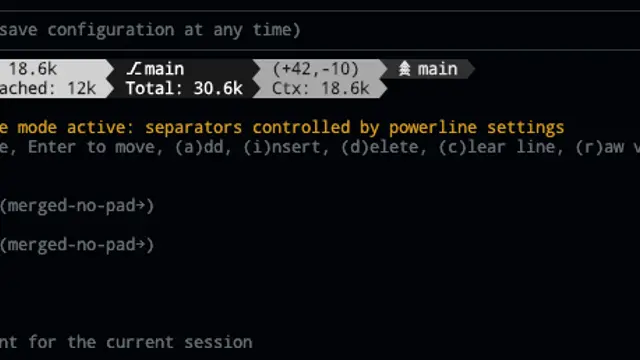
Add a customizable status line to Claude Code CLI displaying model info, Git status, and token usage.
13kMIT#6 · Why we picked it
Safe, beginner level, with 13,352 stars; adds a status line to Claude Code showing model, Git branch and token usage. - PluginSafe
ai
TanStack
A set of skills that teach your agent how to build AI features using the TanStack AI SDK.
3.2kMIT#7 · Why we picked it
Safe, quality 95, and teaches your agent to add streaming chat or tool calling with the TanStack AI SDK, or migrate from Vercel AI SDK. - MCP serverSafe
mcpvault
bitbonsai
A local MCP server that allows AI agents to read, search, and edit notes within an Obsidian vault.
1.7kMIT#8 · Why we picked it
Safe, beginner level, and runs locally so your agent can read, search and edit notes in an Obsidian vault.
How to choose
- Start with resources labeled safe. This week, xerj, opencodex and registry are labeled caution, so check what they access before you install.
- Match the level to your experience. Beginner items like hyperframes, SeeCode and ccstatusline are easier to try. Intermediate items like agent-device and cclsp need more setup.
- Check what it needs to connect. The SEO resource works with your Google Search Console, Analytics and Bing data, so you will need access to those accounts.
- Install one at a time and test it on a small task. This makes it easy to see what each tool changes in your workflow.
FAQ
What does the caution label mean?
It means the resource passed our checks but we flagged something worth reading about first. This week xerj, opencodex and registry have it. Review their pages and permissions before you install.
Which new resources are best for a first-time user?
Try hyperframes, huashu-design, SeeCode or ccstatusline. All are safe and beginner level, and each gives a visible result quickly.
Can I use other AI models with Claude Code or Cursor?
opencodex is a local proxy that connects models like Gemini, DeepSeek or Ollama to agents like Claude Code and Cursor. It is labeled caution and intermediate level, so read its page first.
How often is this digest updated?
Every week. It lists resources added to Airsc in the last 7 days.