Best Integrations & Automation Resources for Vibe Coders
Updated 16/10/2026
This guide is for vibe coders who want their AI agent to do more than write code. You want it to open issues, send messages, read your calendar, or run a workflow while you do something else. You do not need to be an expert, but you should be ready to sign in to a few accounts.
The resources below connect your agent to other apps. Some are simple and safe to try first. Others are bigger platforms that need setup, self-hosting, or extra care with permissions. We say which is which.
- MCP serverSafe
github-mcp-server
github
Connects AI tools directly to GitHub, enabling agents to manage repositories, issues, PRs, and analyze code using natural language.
34kMIT#1 · Why we picked it
Highest quality score here (98), labelled safe and beginner level, and it lets your agent handle repos, issues and pull requests in plain language. - PluginSafe
zapier-mcp
zapier
Provides the official plugin for Zapier MCP, enabling AI agents to connect and automate workflows across 9,000+ apps in plain English.
428MIT#2 · Why we picked it
The official Zapier plugin, labelled safe and beginner level, that reaches 9,000+ apps in plain English; you will need a Zapier account. - MCP serverCaution
activepieces
activepieces
Activepieces is an open-source, no-code automation platform with a large MCP toolkit for AI agents, allowing users to build workflows and integrate with various services.
25k#3 · Why we picked it
A no-code visual builder with a large MCP toolkit and beginner level; it is labelled caution, so check which permissions you give each connection. - SkillSafe
cli
googleworkspace
A command-line interface for Google Workspace APIs that includes over 40 AI agent skills for managing Drive, Gmail, Calendar, and more.
31kApache-2.0#4 · Why we picked it
Labelled safe, with 40+ agent skills for Drive, Gmail, Calendar and Sheets; it is intermediate, so expect some Google API setup. - MCP serverSafe
n8n-mcp
czlonkowski
n8n-MCP is an MCP server providing AI assistants with comprehensive access to n8n's node documentation and operations to build workflows.
23kMIT#5 · Why we picked it
Labelled safe, it gives your agent n8n node docs so it can build and edit workflows for you; you still need an n8n setup to run them. - PluginCaution
n8n
n8n-io
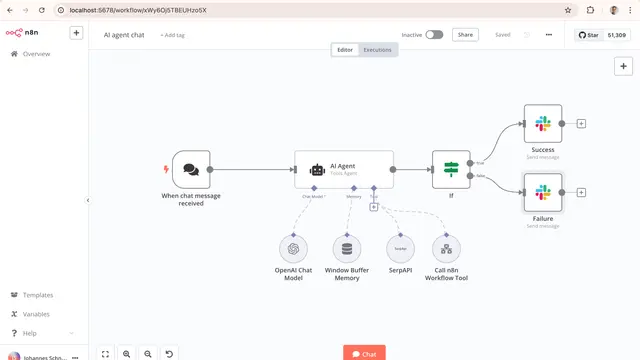
A fair-code workflow automation platform with native AI capabilities, enabling the visual building and deployment of AI agents and complex workflows with 1500+ integrations.
208k#6 · Why we picked it
A very popular workflow platform (quality 96) with 1500+ integrations that you can self-host; it is labelled caution and intermediate, so plan time for setup. - MCP serverCaution
composio
ComposioHQ
Provides 1000+ pre-authenticated tools and integrations for AI agents to perform actions across various web services.
30kMIT#7 · Why we picked it
Offers 1000+ pre-authenticated tools such as Gmail and Slack and handles per-user sign-in; it is labelled caution, so limit what the agent can touch.
How to choose
- Start with a safe label and beginner level, such as github-mcp-server or zapier-mcp, before trying the larger platforms.
- Pick by the app you already use. GitHub work fits the GitHub server, and Gmail or Calendar fits the Google Workspace CLI.
- Treat caution labels seriously. Give each tool the smallest permissions it needs, and use a test account first.
- Choose no-code platforms (Activepieces, Zapier, n8n) for repeating tasks, and a direct MCP server for one-off actions in chat.
- Expect to sign in or create API keys for most of these. Read the setup steps before you install.
FAQ
What is the easiest one to start with?
github-mcp-server has the top quality score, is labelled safe and is beginner level. If you want many apps at once, zapier-mcp is also safe and beginner level.
Do I need to know how to code to use these?
Not much. Activepieces and Zapier use visual or plain-English setups. n8n and the Google Workspace CLI are intermediate, so they take more setup.
Is it risky to let an AI agent act in my accounts?
It can be. An agent can send emails or change data. Use the safe-labelled tools first, limit permissions, and test on a spare account before using your real one.
What is the difference between n8n and n8n-mcp?
n8n is the automation platform that runs workflows. n8n-mcp is an MCP server that helps your AI assistant build and edit those workflows using n8n's node docs.