Best Browser automation & web data resources for vibe coders
Updated 16/10/2026
This guide is for vibe coders who want their AI agent to open web pages, click buttons, search the web or pull data from sites. You do not need to be an expert. We list the easier options first and flag the ones that need setup.
These resources unlock tasks like testing your own app in a real browser, researching a topic online, and turning messy pages into clean data. Most are rated safe. A few are marked caution, so read their pages before you install them.
- SkillSafe
playwright-mcp
microsoft
An MCP server that lets your agent control a browser through Playwright using structured accessibility snapshots instead of screenshots.
38kApache-2.0#1 · Why we picked it
Beginner level, safe, and the most-starred Playwright option (37,884), good for clicking through your own app or filling forms. - PluginSafe
exa-mcp-server
exa-labs
The Exa MCP server connects AI agents to Exa for web search, content fetching, and multi-step research, available as a hosted service or plugin.
5.1kMIT#2 · Why we picked it
Beginner level, safe, quality 95; adds web search, page fetching and multi-step research, offered as a hosted service or plugin. - MCP serverSafe
firecrawl-mcp-server
firecrawl
An official MCP server that enables AI agents to search, scrape, and interact with the live web for clean, structured data.
7.6kMIT#3 · Why we picked it
Safe, quality 95, official server that turns a known URL into structured JSON; expect some setup as it is rated intermediate. - MCP serverSafe
apify-mcp-server
apify
This MCP server allows AI agents to extract data from various websites using Apify's thousands of ready-made scrapers, crawlers, and automation tools.
11kMIT#4 · Why we picked it
Safe, quality 95, gives access to thousands of ready-made scrapers for shops, social media and search engines; intermediate, so plan for account setup. - PluginSafe
chrome-devtools-mcp
ChromeDevTools
This MCP server allows your coding agent to control and inspect a live Chrome browser for automation, debugging, and performance analysis.
54kApache-2.0#5 · Why we picked it
Safe and very popular (53,613 stars); lets the agent inspect a live Chrome for debugging, network requests and performance. - SkillSafe
skills
browser-act
This skill enables AI agents to perform real-browser automation and web data extraction, bypassing anti-bot measures.
6.1kMIT#6 · Why we picked it
Safe, quality 95; real-browser automation for sites with anti-bot checks, with a hand-off to you when the agent gets stuck. - PluginSafe
ego-lite
citrolabs
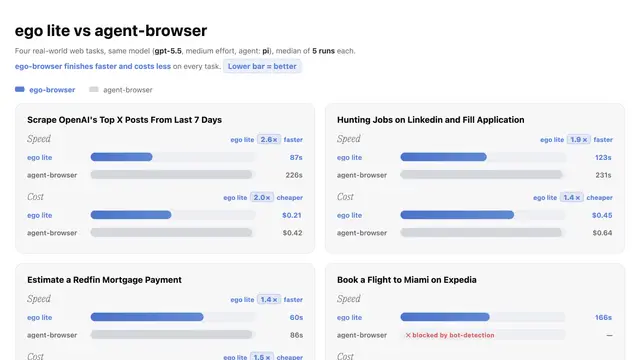
This browser lets AI agents run web automation tasks in isolated workspaces, sharing your logged-in state without disturbing your browsing.
17kMIT#7 · Why we picked it
Beginner level and safe; runs tasks in isolated workspaces and reuses your logged-in state without disturbing your own browsing. - MCP serverCaution
wigolo
KnockOutEZ
Wigolo is a local-first web intelligence MCP server that empowers AI agents with capabilities for searching, fetching, crawling, and researching the web without API keys or cloud services.
5.4k#8 · Why we picked it
Beginner level and runs local-first with no API keys or cloud services, but it is marked caution, so review it before installing.
How to choose
- To test your own app, start with playwright-mcp or chrome-devtools-mcp. To get data from other sites, look at Firecrawl or Apify.
- If you only need search and reading pages, a search-focused tool like Exa is simpler than a full browser tool.
- Prefer the safe label first. Treat caution items with care: read the page and check what permissions they ask for.
- Hosted and scraping-platform tools often need an account or API key. Check the setup steps before you commit.
- Only scrape public data and follow each site's terms. Do not use these tools on accounts or data you do not own.
FAQ
What is the easiest way to start with browser automation?
Try playwright-mcp. It is beginner level, rated safe, and lets your agent open your app and click through it. Ask for one small task first, like checking a login form.
Do I need API keys?
It depends. Wigolo says it works without API keys or cloud services. Hosted and platform tools such as Exa, Firecrawl and Apify usually need an account or key, so check each setup page.
What is the difference between a scraper and a browser tool?
Scraper tools like Firecrawl and Apify return page data in a clean form. Browser tools like Playwright and Chrome DevTools let the agent click, type and inspect a page as a user would.
Why are some resources marked caution?
Caution means the safety check found something worth a closer look. It does not always mean harm, but read the details and understand what access it needs before installing.